Sales Forecast Software Worth Using if You're Not Enterprise
These four tools actually forecast without breaking a startup's budget.

Sales forecasting software has a size problem. Most of it gets built for companies with dedicated revenue operations teams and six-figure software budgets, then gets marketed to everyone else anyway. That's a mismatch, and it costs smaller teams real time and money before they even book a demo.
Here's why. Large enterprises made up 57.65% of 2025 sales software spend, according to Mordor Intelligence. Money follows attention, so most forecasting tools get designed around what big buyers want: multi-team rollups, layered permissions, dedicated staff to run the thing. Meanwhile SMBs are the fastest-growing customer group, at a 12.12% compound annual growth rate. Product design hasn't caught up with that shift yet.
Look at what's on the shelf. Salesforce doesn't turn on its full forecasting features until you hit $100 per user per month. Clari, which merged with Salesloft in December 2025 and now operates under the Salesloft name with one leadership team, only gives out pricing on request, built for companies juggling multiple product lines and revenue streams. Terret, the company formerly known as BoostUp before its September 2025 rebrand around a "Virtual Revenue Fleet" of AI agents, follows the same request-only pricing model aimed at revenue operations at scale. InsightSquared gets called out directly in independent reviews as too expensive for small and mid-sized businesses.
The shopping problem then compounds the product problem. Cin7's research found 60% of SMBs say they don't know which tools to pick. That's confusion before anyone even opens a pricing page. This guide is built to cut through that noise with criteria that actually apply to a 10- or 20-person sales team, not a repackaged enterprise checklist.
What smaller teams actually need from a forecasting tool
Most small teams start with a spreadsheet. Centage data cited in a 2025 budgeting software guide puts the number at 70% of SMBs still forecasting this way. Spreadsheets don't fail because the formulas are wrong. They fail because someone has to pull the data out, clean it up, and check it again every single week, and that job gets harder as deal volume grows. A significant share of businesses with fewer than 10 employees don't even have a CRM yet, so the upgrade often has to happen on two fronts at once: get a CRM, then get forecasting on top of it.
That means the right tool has to behave differently than enterprise software does, in a few specific ways.
- It should work without a hired implementation team. Value should show up in days, not after a 2 to 4 week setup that needs outside consultants.
- It should plug into the CRM already in use, or just be the CRM. No separate pipeline needed to feed data into the forecast.
- Its AI should learn from the deals already sitting in the system, not from a schema someone with a RevOps title had to build first.
- Forecasting should be priced at a tier a small team can actually reach, not locked behind an enterprise-only plan.
- Updating a forecast should take less effort than closing the deal it's based on. The moment that math flips, reps stop updating anything.
There's a reason this matters beyond convenience. Gartner found only 7% of companies hit 90% or higher forecast accuracy. Digital Bloom's 2025 research found companies that track pipeline velocity weekly land around 87% accuracy, compared to 52% for teams that check in less regularly. That's a wide enough gap to affect hiring plans, cash flow, and quota-setting at a company of any size. Ease of adoption, CRM-native integration, AI that doesn't need a manual, and clear pricing at the forecasting tier: those four things are the lens for everything below.
HubSpot Sales Hub: the free starting point with a real ceiling
HubSpot's free tier is a genuine offer, not a bait-and-switch. Up to two users, contact management, email, and core CRM features at no cost. Independent reviews suggest teams under five people can cover a meaningful share of their core needs without spending anything.
2026 pricing looks like this:
- Free: $0, capped at 1,000 contacts
- Starter: $20 per seat per month, no forced onboarding
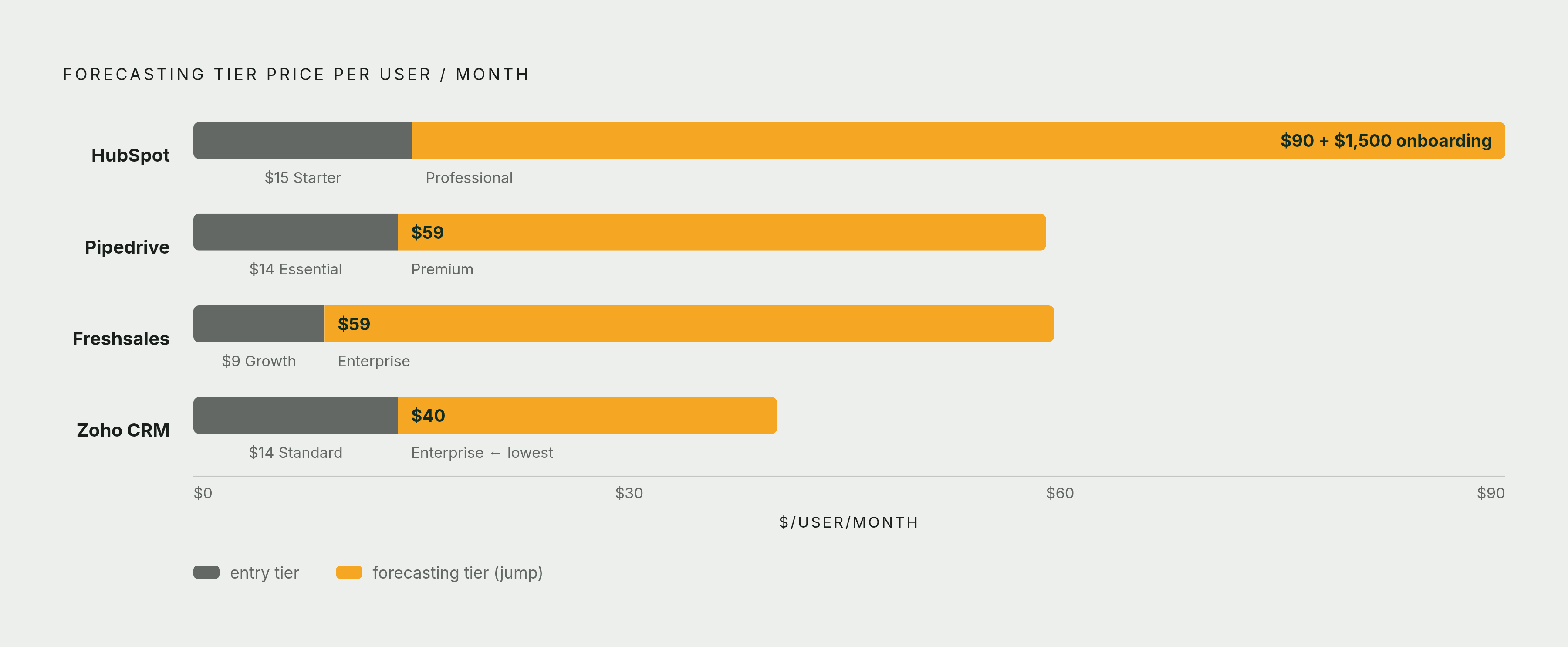
- Professional: $90 per seat per month, plus a required $1,500 onboarding fee
- Enterprise: $150 per seat per month, plus a required $7,000 onboarding fee
Here's where the ceiling shows up fast: forecasting, deal scoring, and automation sequences all live behind Professional. Starter doesn't get you there. A five-person team on Professional runs about $7,500 in first-year subscription costs plus that $1,500 onboarding charge, according to independent reviews.
HubSpot's own 2025 ROI Report claims a 94% jump in closed deals for Sales Hub customers after six months. That's a vendor's own number, not an independent one. A separate figure from HubSpot's 2026 State of Sales Report is worth sitting with too: 72% of revenue and sales leaders say their tools don't give them complete, accurate revenue data. Even inside HubSpot's own ecosystem, that gap shows why CRM-native forecasting is the thing to check first, not last.
Free is a fine place to start and validate the process. But if forecasting is the actual goal, budget for Professional from day one. Treating free as a long-term forecasting plan is setting expectations that the product isn't built to meet.
Pipedrive: pipeline-first CRM built at the right price point for teams of 5–25
Pipedrive now serves more than 100,000 companies worldwide. In July 2025 it renamed every plan: Essential became Lite, Advanced became Growth, Professional and Power merged into Premium, Enterprise became Ultimate.
2026 pricing, billed annually:
- Lite: $14 per user per month. Includes pipeline management and basic reporting.
There's no permanent free plan, but the 14-day trial gives full access to every feature with no credit card required. The AI Sales Assistant watches deals, contacts, and emails in the background and surfaces win probability, flags deals going stale, and suggests next steps, all without anyone writing a prompt. G2 rates it 4.3 out of 5.
It's not without limits. Multi-currency reporting and territory management are thin compared to true enterprise platforms, and reps who want deep custom analytics will hit a wall. As a general pattern in independent reviews, Pipedrive tends to suit teams in the 5 to 25 rep range best, with smaller teams often covered by free-tier tools and larger teams bumping against reporting limits.
That 5 to 25 range is exactly where Pipedrive earns its keep. Revenue forecasting at $59 per user per month, no forced onboarding fee tacked on. Compare that to what HubSpot charges to reach the same feature.
Zoho CRM: the broadest feature set per dollar for budget-constrained teams
Zoho's free edition supports up to three users, and it's permanent, not a trial that expires. That's a real starting point for a very small team.
2026 paid tiers, billed annually:
- Standard: $14 per user per month
- Professional: $23 per user per month
- Enterprise: $40 per user per month
- Ultimate: $52 per user per month
Forecasting lives in Enterprise and Ultimate, powered by Zoho's AI assistant, Zia. Predictive lead scoring, anomaly detection, forecasting, and conversational insights are all powered by Zia and become available at the Enterprise tier. Independent comparison data puts Zoho at roughly 30 to 40% cheaper than Freshsales on matching tiers.
Zoho also wins on reach: Salesforce holds a dominant position in CRM revenue, but Zoho has broad adoption particularly among SMBs. That popularity has a catch. Setup takes noticeably longer than Pipedrive. Independent reviewers consistently flag that setup takes noticeably longer than Pipedrive, and a team without in-house ops support needs to plan around that stretch.
Zoho is the pick for a team that's willing to spend setup time upfront to save money every month after. It's not the fastest way to get to forecasting. It's the cheapest way to get there eventually.
Freshsales: the right pick when the phone matters as much as the pipeline
Freshsales sits inside the Freshworks suite, aimed squarely at small and mid-sized businesses.
2026 pricing, billed annually:
- Growth: $9 per user per month
- Pro: $39 per user per month
- Enterprise: $59 per user per month
Freshworks runs a 21-day free trial with full access to paid features.
Forecasting sits behind Enterprise. Pro gets deal scoring and basic forward-looking views, but the AI-powered forecasting insights don't show up until Enterprise, meaning $59 per user per month is the real number to budget for if forecasting is the reason you're buying.
The clearest difference from Zoho is the phone. Freshsales ships with a dialler built in. Zoho needs a PhoneBridge integration connected to a telephony provider, whether that's Zoho's own Voice product or a third party. For a team that spends its day on outbound calls, that's one less system to stitch together.
The trade-off is honest: Freshsales covers less ground overall than Zoho does. What it offers instead is calling, lead capture, and forecasting sitting in one interface. Pick based on how central the phone actually is to how the team sells.
Salesflare: the lowest-admin option for B2B teams that live in their inbox
Salesflare markets itself as a simple CRM for small and mid-sized B2B companies, and the design backs that up. Contact and company data get pulled in automatically instead of typed in by hand. It connects to email, calendar, and LinkedIn. The goal is a CRM that stays current without anyone being told to go update it.
Forecasting works by adding up deal values across pipeline stages, giving a sales manager a workable revenue projection without another layer of setup on top of the CRM itself.
This fits a specific kind of team: small B2B shops where reps handle their own prospecting, outreach, and follow-up without a separate admin or ops function backing them up. Tools that need constant manual data entry tend to get quietly abandoned by exactly this kind of rep. Salesflare's bet is that automating the data entry away solves that before it starts.
The same logic shows up elsewhere in sales AI. A tool that sits alongside the inbox and CRM, logging updates and surfacing next steps without anyone prompting it, keeps a rep's attention on the actual conversation instead of on data entry. Nextstep works on that same principle, connecting to Salesforce, HubSpot, and other existing tools to draft replies, log CRM updates, and set next steps automatically.
How to match the right tool to where your team actually is
There's no single "best" tool here. Which gap needs closing first is the right question to ask.
- No CRM yet, fewer than five reps, tight budget: start with HubSpot Free, with a known upgrade path to Professional once forecasting becomes the priority.
- 5 to 25 reps, need pipeline visibility and AI deal insights without a forced onboarding fee: Pipedrive Premium at $59 per user per month.
- Budget is the hard constraint and there's time to spend on setup: Zoho CRM Enterprise at $40 per user per month, with a realistic implementation stretch built into the plan.
- Outbound calling drives the business: Freshsales Enterprise at $59 per user per month, for the built-in dialler and forecasting together.
- The main headache is admin work, and the team is B2B and inbox-driven: Salesflare.
Notice the pattern repeating across nearly every tool on this list: the feature that justifies the purchase, forecasting, almost always sits one tier above the entry price. Before signing anything, find the exact tier where forecasting turns on. Don't discover it after the invoice.
None of this matters if the CRM data underneath is bad. That 72% figure from HubSpot's 2026 State of Sales Report, on revenue and sales leaders who say their tools don't give them complete, accurate revenue data, applies no matter which tool sits on top of it. A forecasting tool built on stale or incomplete records still gives you a number. It's just a confident, wrong one. The tool matters less than the discipline of keeping the data under it clean.
The AI worth paying for follows one rule across every product here: it shows up inside work someone was already doing. Win probability sitting right in the deal view. A next-step suggestion inside the inbox. A call note that logs itself. AI that requires opening a separate window and typing out a prompt is adding a step, not removing one.
And for teams already running Salesforce or HubSpot as their system of record, the integration question usually matters more than the forecasting screen itself. A tool that writes results back into the CRM automatically stays accurate as the quarter moves. One that needs a manual export and import cycle starts drifting the moment someone forgets to run it.