Why CRM Notes Stay Empty After Every Call
Reps skip CRM notes because the system rewards managers, not the people actually selling.
79% of the opportunity data reps gather never makes it into the CRM. Not because they forgot. Not because nobody trained them. It stays out because the system that's supposed to capture it wasn't built with the rep in mind. Fix the incentive, and the empty notes field problem starts to look a lot more solvable than another round of mandates ever will.
Every sales manager knows the pipeline review where half the deals haven't moved in three weeks, the close date got pushed again, and the notes field says "discovery call" and nothing else. The usual response is to tighten the screws: mandate updates, tie CRM hygiene to commission, run a Monday audit, send a reminder email nobody reads. And for a little while, it works. Then the same stale pipeline shows up next quarter, and the manager reaches for the same three levers again.
That repetition is the tell. If the fix worked, managers wouldn't need to keep reapplying it. What looks like a discipline problem is actually a design problem. The CRM, as most reps experience it, was built to serve everyone in the building except the person typing into it.
Who benefits when a rep logs a call
Follow a logged call downstream and it's easy to see who's cashing in. A manager uses it to build the pipeline report. Finance uses it to sanity-check the forecast. Marketing mines it for account-based targeting. If the deal closes, onboarding uses it to build the customer's welcome package.
Now ask what the rep gets back for typing it in. Nothing that helps close a deal this quarter. Not one thing.
That's the whole problem in one sentence. The rep's job is to move pipeline and close deals, full stop. Every minute spent writing a call summary is a minute not spent doing either of those things. This is a textbook incentive mismatch: the person doing the work and the people who benefit from it are different people, on different clocks, chasing different goals. Ask a rep to choose between one more discovery call and one more polished CRM note, and the math isn't close.
The time a rep spends feeding the CRM
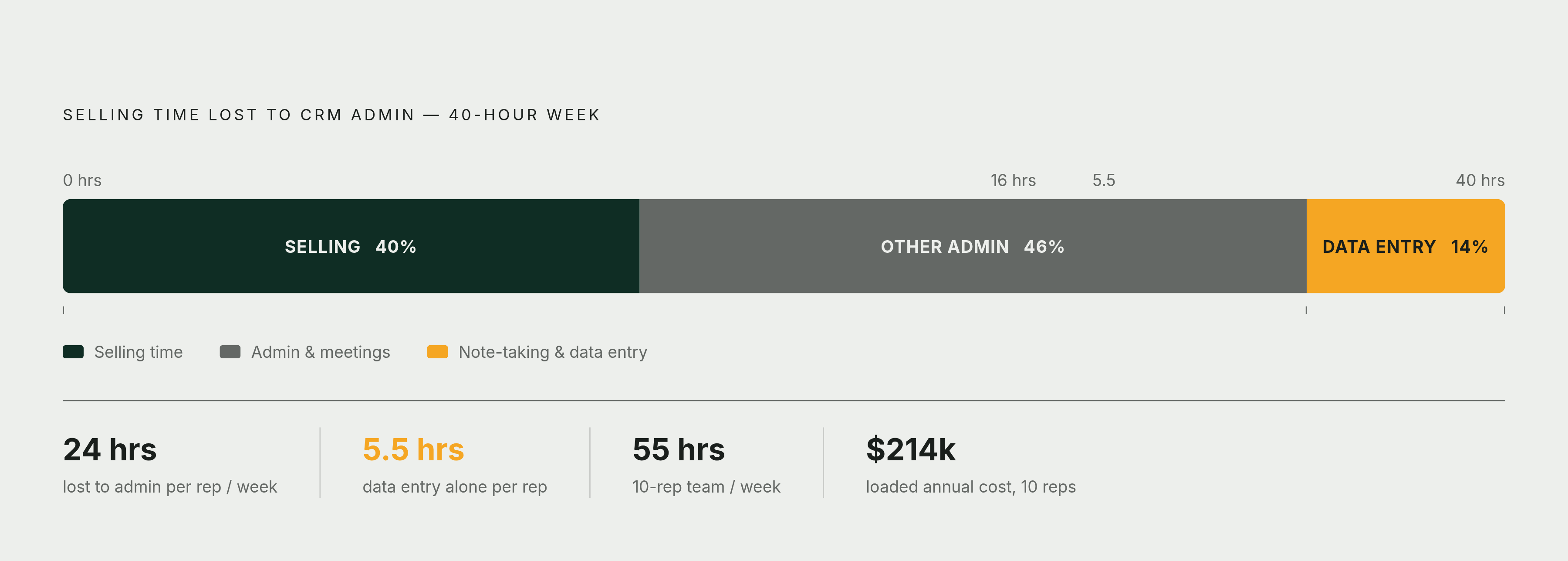
Here's where the mismatch turns into a real number. The average B2B sales rep spends something like 40% of the workweek actually selling. The other 60% goes to admin work: data entry, internal meetings, CRM upkeep. That's roughly 24 hours a week where the rep isn't in front of a buyer.
Ask reps directly what eats the most time, and 68% point to note-taking and data entry specifically. Not calls. Not prospecting. Typing.
Put a dollar figure on it and it gets uncomfortable fast. A rep loses something like 5.5 hours a week to this. Multiply that across a 10-person team and it's roughly 55 hours a week, which at a fully loaded cost works out to somewhere around $214,000. Scale that up to a 25-rep team losing 12 hours each, and the organization has effectively erased about 7 full-time equivalents of selling time, not to layoffs or budget cuts, but to data entry.
That's most of a sales team, gone, and nobody made the decision to cut it. That's most of a sales team, gone, and nobody made the decision to cut it. The CRM just quietly took it.
How CRM interfaces make the problem worse by design
Part of the reason this keeps happening is that most CRMs were built to store data, not to make storing data easy. The fields on a typical deal page exist because a manager needs them for a forecast, not because a rep needs them to close. Nobody designed the interface around the person who has to fill it in five times a day.
Think about what that looks like for a team running 40 to 80 calls in a day. Updating the CRM after every single one of those conversations, properly, is overhead nobody actually signed up for when they took a sales job. They signed up to sell.
Reps notice. Roughly 20% of CRM users end up switching systems because the interface is too hard to use day to day, and about 30% describe their sales tools as inefficient. That's a product telling its users, pretty clearly, that it wasn't built for them. That's a product telling its users, pretty clearly, that it wasn't built for them.
What enforcement produces when mandates replace design fixes
So managers reach for the lever that's actually in their control: enforcement. Tie the CRM update to commission, and watch what happens. For a week or two, it works. Fields fill in. The dashboard turns green. Everyone breathes easier.
Then the degradation just moves somewhere less visible. A rep who needs a deal stage marked correctly to protect commission will mark it, but "correctly" and "accurately" aren't the same thing. Close dates get pushed 30 days at a time, on repeat. Stages start reflecting what the rep hopes happens next quarter, not what actually happened on the call. Notes stay thin, because the mandate said "update the stage," not "write something a colleague could actually use."
What enforcement buys is compliance. The CRM looks updated. The real problem, that the underlying data is incomplete or just wrong, is still there. It's just hidden behind a status indicator that's turned green.
It can get worse than thin notes, too. Roughly 37% of staff admit to entering data they know is inaccurate just to satisfy a required field: fake phone numbers, personal emails standing in for business ones, generic placeholder company names. That's not laziness. That's a rational response to a system that demands an input regardless of whether a real one exists.
What the organisation loses when call context never reaches the CRM
The underlying data being incomplete or wrong should worry a revenue leader more than a stale pipeline stage. Think about what actually gets said on a sales call: the prospect's real budget timing, who else is involved in the decision, the objection that almost killed the deal, the competitor they mentioned by name, the buying signal buried in an offhand comment.
None of that lives in a pipeline stage. It lives in the conversation. And if that conversation only exists in a rep's notebook, a personal inbox, an unreviewed call recording, or somebody's memory, the organization has no record of what actually happened. The deal can look perfectly active in the CRM while the most recent real conversation about it exists nowhere the company can see.
Three ways that shows up in practice:
- A manager sees a deal sitting at "proposal sent" but has no idea the customer raised a serious concern about implementation timeline three days ago.
- A rep inherits an account from someone who left the company, with zero record of what was discussed on the last call, and has to start the relationship half-blind.
- Customer success picks up a closed deal and has no idea what was promised on a call nobody bothered to log, and finds out the hard way when the customer brings it up.
Follow-up degrades the same predictable way every time: the materials that were promised don't go out, the next call doesn't get scheduled, and the stage never updates to reflect where the deal actually stands. None of that requires a system failure. It just requires nobody to have written it down.
The revenue cost of data that looks complete but isn't
The trust problem is the clearest sign of how deep this goes. Only 35% of sales professionals say they completely trust the accuracy of their own CRM data. Nearly half, 47%, say keeping that data accurate has gotten harder over the past year, not easier, despite all the tooling built to help. That's the people closest to the data saying, out loud, that they don't believe it.
CRM admins back that up from the other side. Roughly 24% report that less than half of the data in their system is accurate and complete. Not partially wrong. Less than half right.
Put a dollar figure on what that costs and the number gets large fast. Gartner has estimated the average organization loses somewhere around $12.9 million to bad data. And separately, companies lose an average of 16 sales deals per quarter tied directly to data that looked fine on the surface but was inaccurate underneath.
That's the trap with data that "looks complete." It doesn't trigger alarms. Nobody flags a pipeline stage that's technically filled in. It just sits there, quietly wrong, until a forecast misses or a deal falls through for a reason nobody saw coming because nobody wrote it down.
Fixes that only reduce friction still leave the structural gap open
A lot of the tools built to fix this only fix half the problem. Sorting through what they actually do matters, because the difference matters.
Faster data-entry interfaces cut down the number of clicks it takes to update a field. That helps. But the rep is still the one doing the translating, from conversation to structured data, and that's still the step that gets skipped under time pressure. Activity capture tools automate the structured stuff, logging calls made, emails sent, meetings held. Useful for a report. Useless for understanding what the customer actually said. Training and change management close skill gaps and awareness gaps. They don't touch the incentive gap. A well-trained rep with no reason to log a call still won't log it.
The information that actually moves a deal, what was said, whether the champion still seems engaged, what objection came up and how it landed, lives in unstructured conversation. Not in a dropdown. Automating the structured fields doesn't reach any of that.
Plenty of companies already have call recording, transcription, and CRM automation in place, and the problem persists anyway, because nobody ever defined what information actually matters or how it's supposed to get used once it's captured. Technology bought before purpose is defined tends to just generate more data nobody looks at.
So what does an actual structural fix have to do? Three things, at minimum:
- Take the rep out of the data-entry loop entirely, not just make the loop faster.
- Capture the unstructured conversation itself, not just the structured fields around it.
- Fit into the workflow the rep already has, instead of asking them to learn a new platform on top of the ones they're already juggling.
Miss any one of those three, and the structural gap stays exactly as open as it was.
What AI-powered auto-capture tools do and where their limits are
By 2026, the technical piece of this is mostly solved. AI can take a call, turn it into a transcript, summarize it, and drop a clean note into the CRM without a human touching a keyboard. What matters is which calls and which workflows the technology actually covers. It's which calls and which workflows it actually covers.
That's where the gap usually hides. A lot of these tools are built as meeting bots: something that joins a Zoom or Teams call as a visible participant and captures the conversation from there. That works fine for scheduled video meetings. It falls apart on an ordinary phone call, because there's no meeting for a bot to join in the first place, and a huge share of sales conversations still happen by phone.
A few tools stand out on their specific merits:
Sybill builds structured "Magic Summaries" out of calls and autofills deal fields directly, MEDDPICC, BANT, competitors mentioned, stakeholders identified, next steps agreed to. On the Business plan it covers 10 fields with CRM autofill included; Enterprise removes that cap. It also drafts follow-up emails and pulls action items out of the conversation automatically. As of May 2026, pricing runs from Essentials at $19 per user per month up to Business at $79 per user per month. Gong records and analyzes customer interactions across calls, email, and web conferencing, with CRM auto-logging that syncs summaries, action items, and key moments back into the deal record. Current pricing and specific plan details aren't confirmed here, so it's worth evaluating on capability rather than cost. Other tools take different shapes, focusing on fitting into existing workflows rather than adding a new platform, though specific capabilities vary and are worth evaluating directly.
None of these tools fix the fact that incentives are misaligned by themselves. What they do is remove the rep as the translation layer, which is the one thing training, mandates, and audits were never going to do. That's the actual test for any fix in this category: does it get the conversation into the CRM without asking the rep to be the one who writes it down? If yes, the structural gap starts closing. If it just makes the typing faster, the same stale pipeline review is waiting next quarter, right on schedule.