Middleware and Native Integration Options for Sales CRMs
Sales reps waste 60 percent of their week on admin work when CRM systems don't connect properly.
This is really a plumbing problem wearing a business-strategy costume. Every sales team eventually has a CRM sitting next to marketing automation, support software, billing, maybe an ERP or a data warehouse. Each one of those tools needs to talk to the CRM. The question was rarely whether to connect them. It's how.
Salesforce's State of Sales 7th Edition, a 2025 survey of 4,050 sales professionals across 22 countries, put a number on what happens when that connection is done badly: reps spend 40% of their week actually selling. The other 60% goes to non-selling work, including manual data entry. That's the real cost of disconnected systems, and it shows up first in a rep's calendar, not in some IT dashboard.
Money is following the problem, too. The CRM integration services market is projected to top $5.02 billion by 2025, growing at a 6.1% annual rate. People are paying to fix this. So let's look at the two main ways they're doing it, native integrations and middleware, and where each one actually holds up.
How native integrations work and what they promise
A native integration is a pre-built, direct connection between a tool and your CRM. You find it in a marketplace, click install, and you're connected. No custom code, no middleman.
A real native integration does two things well: it syncs data in both directions (a record updates in one system, it updates in the other) and it writes activity back so both tools stay current. Setup usually takes minutes through a guided installer.
Salesforce's AppExchange is the biggest example of this model in action. It lists thousands of apps across categories, with sales-focused connectors making up a substantial share of the marketplace. HubSpot's App Marketplace runs a similar playbook: click-to-install connectors, often free at the basic level.
What you get right away is simple: no engineers required, low cost to start, and the vendor handles updates on their end. This is a solid choice for a small team with a handful of standard tools. The HubSpot-Salesforce native connector is a good example. If you're syncing contacts, companies, and opportunities in a fairly standard setup, it works fine.
Where native integrations break down in practice
That same HubSpot-Salesforce connector is also the clearest example of where native hits its ceiling. Custom object support is limited. Sync happens every few minutes, not instantly. Field mapping is constrained, and there's not much room to transform data as it moves between systems.
So what breaks it? Custom objects. Complex deal stages. Lifecycle properties that don't match the default setup on either side. The moment your business doesn't fit the standard mold the connector was built for, you start feeling the edges.
There's also a scaling problem, and it's a simple one: native connectors multiply right alongside your toolset. Five tools means five separate connectors, each with its own quirks, its own error handling, its own update schedule. Nobody designed this to add up gracefully, and it mostly doesn't.
This is where the term "spaghetti stack" comes from. Every new tool means a new custom connection, bolted on, monitored by hand. And when something breaks? Native connectors rarely give you a unified log or error queue to check. Debugging often turns into guesswork, poking at one system and then the other to see what moved.
Native is a fine place to start. It's a much shakier place to still be standing once your stack has grown up around it.
How middleware creates a central integration layer instead
Middleware, sometimes called iPaaS, an integration hub, or an automation platform, takes a different shape entirely. Instead of every tool talking directly to every other tool, everything routes through one central layer.
Here's the structural difference, and it's worth sitting with for a second: point-to-point connections grow fast, since every system needs a direct line to every other system. Middleware flips that. Each system connects once, to the hub, and the hub handles the rest.
Three patterns show up across most middleware platforms:
- Message-oriented middleware uses queues. A system sends its update and moves on, without waiting around, and the middleware makes sure the message gets delivered even if the receiving system is temporarily down.
- Event-driven architecture reacts to specific business events, things like "CustomerUpdated" or "PaymentFailed," instead of constantly polling systems for changes. That means faster syncing and less strain on the source system.
- API-led connectivity, the model MuleSoft is built around, has systems expose reusable APIs, with the middleware routing and governing traffic between them.
What all three buy you is the same basic thing: one place to look at logs, one place to handle errors, one place to write transformation rules. And when a new tool joins the stack, you don't have to touch the existing connections at all.
This lines up with where demand is actually heading. Over 66% of businesses now say they want real-time integration, and 58% prioritize API-based architecture across their systems. Middleware, by design, is built for both.
One more distinction worth knowing: an Enterprise Service Bus (ESB) is still the standard in many regulated or hybrid on-premise environments. Cloud-first teams, by and large, default to iPaaS instead.
The middleware vendor landscape from no-code to enterprise
The iPaaS market was valued at $15.63 billion in 2025, according to Fortune Business Insights, and is projected to hit $108.76 billion by 2034, growing at a 24.20% annual rate. That's a much faster climb than the CRM software market overall, and it tells you something: the demand for connecting systems is piling up faster than the demand for the systems themselves.
No-code and SMB tier. Zapier and Make charge based on how much you use them, task by task. Cheap to start, but the bill climbs as you add more automations. Good fit for a small team connecting a few standard SaaS tools with nothing custom and little need for instant syncing.
Mid-market tier. Celigo, Jitterbit, and Tray.io sit here, offering more structure and oversight than the no-code tools while remaining faster to get running than a full enterprise platform. This tier is aimed at teams running specific initiatives with common SaaS, ERP, and CRM combinations.
Enterprise tier. MuleSoft, owned by Salesforce, is built around API-led architecture with deep support for Salesforce's data model. It starts around $80,000 a year, which sounds steep until you're dealing with custom objects, real-time sync across ERP, e-commerce, and support systems, at enterprise-scale volume, at which point it starts to make sense. MuleSoft launched Agent Fabric in October 2025 for governing AI agents.
Dell Boomi, one of the earlier iPaaS platforms, supports both cloud and on-premise setups and has continued expanding its enterprise connectivity capabilities. Workato, built for both business and IT users, has been adding capabilities aimed at AI-agent orchestration with data protection considerations built in. Informatica brings deep data integration and governance for enterprises managing heavy volume and compliance requirements.
Pricing at the top tier is custom, and contracts frequently land in the five or six figures annually. That said, roughly 55% of organizations now say they prefer low-code iPaaS platforms, the middle ground between "click to install" and "enterprise contract."
One more thing worth flagging heading into 2026: AI-agent orchestration is becoming something teams actually shop for, not just workflow automation, and major middleware vendors are responding with new capabilities in this space. Three forces are reshaping these shortlists right now: legacy on-premise integration platforms reaching end-of-life, evolving data-sovereignty requirements, and the shift from static workflows toward AI-agent-driven orchestration.
The real cost of both approaches, including what teams undercount
Here's where it gets a little sneaky. Native integration doesn't come with a license fee, so it looks free. But the cost doesn't disappear, it just moves. It shows up in engineering time when a connector breaks, in duplicate records from mismatched sync timing, in someone manually reconciling data that should've matched in the first place.
Custom point-to-point integrations built without middleware carry the same problem, just worse. Every new connection adds more surface area to maintain, and a broken sync in one connection doesn't alert anyone about the others. The debugging burden just sits there, indefinitely, waiting for someone to notice.
Middleware, by contrast, is upfront about its costs. Enterprise platforms like MuleSoft, Boomi, Workato, and Informatica run on custom contracts that frequently reach five or six figures a year. SMB tools like Zapier scale their pricing with usage, so the bill grows as you do.
At scale, the numbers get bigger fast: large enterprises frequently spend more than $20 million a year on integration overall, while SMEs typically spend $500,000 to $5 million per project. Middleware itself is only a slice of that total, but it's a real, visible line item, unlike the buried cost of native.
And here's a statistic worth sitting with: about 46% of firms name integration complexity as a barrier, and 44% cite limited internal expertise. Notice that neither of those numbers is about which platform you pick. They're about whether you have the people to run whichever one you choose. That's a cost multiplier no matter which path you're on, including middleware itself, since someone still has to govern and administer the platform.
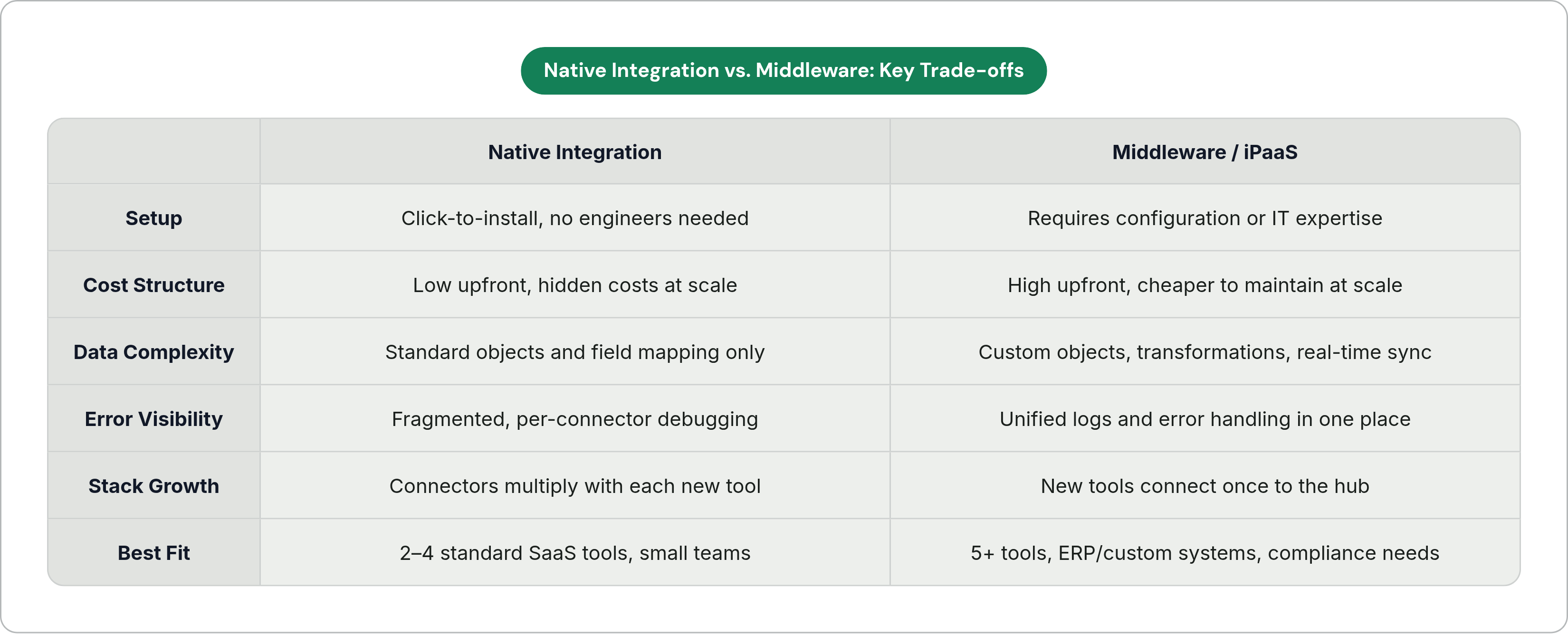
The trade-off, plainly stated, is this: native is cheap to start and tends to get more expensive as it scales. Middleware is expensive to start and tends to get cheaper to maintain as your stack grows. Neither one is free. They just charge you at different points in the story.
Four factors that determine which approach fits a given team
Factor 1: how many tools you're running. Two to four standard SaaS tools? Native usually covers it. Five or more, especially once you add something non-standard like an ERP or billing system, and middleware's hub model starts paying for itself.
Factor 2: how complex your data is. Standard objects like contacts, companies, and deals, with clean field mapping? Native handles that fine. Custom objects, complex deal stages, data that needs transforming as it moves between systems? That's where native breaks and middleware becomes the requirement, not the upgrade.
Factor 3: how fast things need to sync. If a lag of a few minutes doesn't bother anyone, native is fine. But if you need real-time updates, live lead routing, pricing changes, inventory, event-driven middleware is the right architecture for the job. Remember, over 66% of businesses already say they need real-time integration. That's not a niche preference anymore.
Factor 4: what your internal team can actually support. A small team with no dedicated integration engineer should stick to no-code native tools or low-code iPaaS platforms like Zapier, Make, or Jitterbit, that's a realistic ceiling. A team with dedicated IT and real compliance requirements can justify the cost of MuleSoft, Boomi, or Workato. Remember that 44% expertise gap. This factor often rules out an option before cost ever does.
Put together, a few common scenarios emerge. A startup with five standard integrations is well served by native plus one no-code tool. A mid-market company bolting an ERP and a data warehouse onto an existing CRM and marketing stack has hit the inflection point where middleware makes sense. An enterprise juggling real-time requirements, custom objects, and compliance obligations needs enterprise iPaaS, plain and simple.
Where AI-assisted tools fit into the integration picture for sales teams
Here's the part that gets missed. Integration infrastructure solves how data moves between systems. It does little about the administrative work reps still have to do inside those systems, even once everything's connected.
A well-synced CRM still needs someone to log the call, draft the follow-up, update the deal stage, and book the next meeting. That 60% non-selling time problem from earlier doesn't go away just because the systems talk to each other nicely. It just moves up a layer.
That's the layer AI tools built for sales are starting to work in, running alongside the inbox, the calls, the CRM itself, drafting replies, logging updates, booking next steps automatically. But how a tool like that gets built into your stack matters just as much as what it does. A tool that needs its own new platform on top of everything else just adds one more connection to manage. A tool that plugs directly into Salesforce or HubSpot through the integration architecture you've already built adds none.
Some tools work this way, connecting directly with Salesforce and HubSpot to handle logging, drafting, and next-step booking without asking reps to learn a new platform or write prompts. They pick up deal context and tone from the environment that's already there.
The value compounds when you stack these things right: a well-integrated CRM keeps the data clean, and AI automation on top of it keeps reps focused on actual selling instead of babysitting that data by hand. So before adding any AI tool to the mix, it's worth asking one plain question: will this work through the integration model we already have, or is it about to become one more point-to-point connection we now have to maintain?
How to approach the decision without overbuilding or underbuilding
Start with an audit, not a purchase. Count your active integrations. Figure out which ones break the most. Write down where someone's manually reconciling data right now, because that's often the clearest sign of where the real cost is hiding.
From there, map your sync requirements. Which connections need real-time updates, and which can tolerate a few minutes of lag? This one question often settles whether native is even in the running.
Check your complexity threshold honestly. If any system on your list has custom objects or non-standard fields, plan for that now, don't assume a native connector will cover it later.
Match the platform to what your team can actually run, not what looks impressive on a vendor call. A powerful enterprise iPaaS with nobody who knows how to administer it isn't an asset, it's a liability. That 44% expertise gap is real, and it applies to you too.
And build for where your stack will be in 18 months, not where it is today. The services side of the CRM market is growing at a 9.52% annual rate, which is really just a stat confirming what most teams learn the hard way: their integration needs grow faster than they expect.
None of this has to be decided once and locked in permanently. Start with native where native works well. Move to middleware once maintenance headaches or sync failures start costing more than a platform subscription would. And whatever layer you choose, make sure any AI or automation tool you add connects through it, not around it. Otherwise the administrative burden your integrations were supposed to eliminate just finds a new hiding place.