CRM Data Hygiene Automation in Salesforce and HubSpot
Salesforce and HubSpot need automation to catch decay that native tools alone can't prevent.
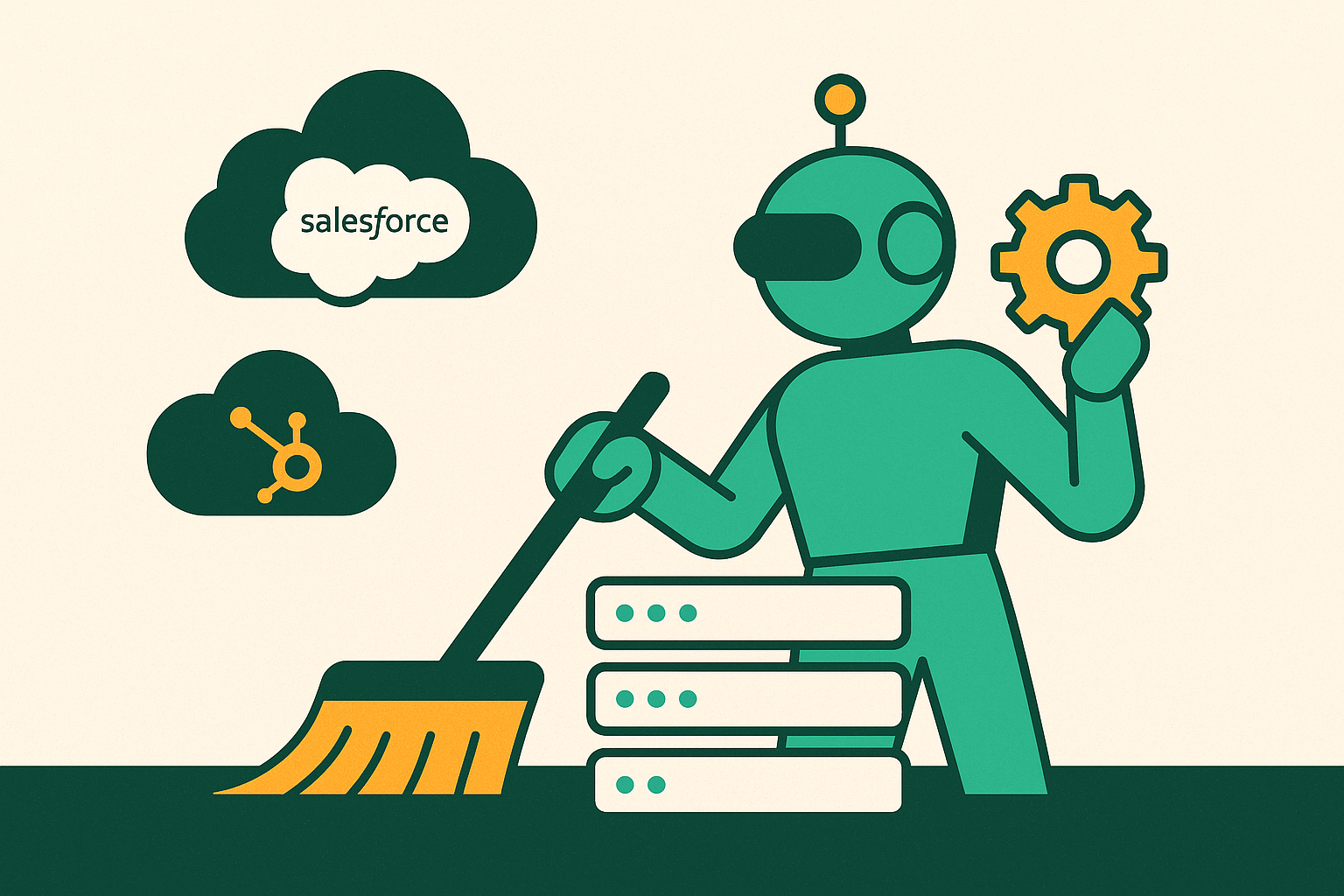
CRM data doesn't sit still. Every year, a chunk of your contact database goes stale: people change jobs, companies restructure, phone numbers get reassigned, emails bounce. None of that shows up as an error message. The record just sits there, looking fine, quietly wrong.
Salesforce and HubSpot are both built to store and display data, not to check whether it's still true. A contact who left their company over a year ago can still show up with an active title, a working-looking phone number, and an email address that hasn't bounced yet in your view, even if it's bouncing everywhere else. The CRM has no way to tell the difference between "current" and "was current when someone typed it in."
Wait long enough, and the problem compounds. The longer a bad record sits untouched, the more of your database needs fixing, and the less anyone trusts what's in there at all. The question isn't whether your data will decay. It's whether your automation is built to catch it, or just built to store it.
What dirty data actually costs in rep time and revenue
Start with the obvious one: time. Reps burn hours every week untangling duplicate accounts, hunting down a phone number that actually works, double-checking whether the "VP of Marketing" on the record still works there. That's time not spent talking to prospects.
Then it hits forecasting. Pipeline reports built on duplicate or incomplete records don't reflect reality, and most sales orgs miss their forecast by a wide margin most quarters. Dirty data is far from the only reason for that, but it's a direct contributor, and it's the one nobody wants to admit to on the call with leadership.
A lot of CRM users say they've lost actual revenue to bad data: wrong contact, missed renewal, a dead lead treated as live and worked for three weeks before someone notices.
There's also a gap between what a CRO believes about the data and what RevOps believes. Ask the CRO, and the data's probably fine. Ask RevOps, the people actually elbow-deep in it every week, and you get a different answer. That gap matters, because as long as leadership thinks the data's fine, nobody signs off on the budget to fix it.
Then there's AI. Gartner has said flatly that most AI projects will get abandoned through the middle of the decade because the data underneath them isn't ready for an agent to act on. If Einstein or Agentforce is anywhere on your roadmap, this is a live problem right now, not a future one.
The five hygiene problems automation is actually solving
"Dirty data" isn't one thing. It's at least five different problems wearing the same trench coat, and mixing them up is how cleanup projects stall.
- Duplicate records. Same contact or company, entered twice, splitting the history and corrupting every report that touches it.
- Outdated information. Titles, emails, phone numbers, company names, all correct the day someone typed them in, all wrong now.
- Missing fields. Blank properties that break segmentation, routing, and scoring before those models get a fair shot.
- Formatting inconsistencies. Capitalization, date formats, phone number styles. Small stuff, but it quietly breaks matching and aggregation.
- Bad data at entry. Misspelled domains, invalid emails, placeholder text like "test test." Wrong from the second it hit the system.
Each one needs its own fix: deduplication, enrichment, validation, normalization, monitoring. A tool that's great at one of these might do almost nothing for the other four. Worth remembering before you buy something that promises to solve "data quality" in one shot.
What Salesforce handles natively and where it stops
Salesforce ships with a decent toolkit. No add-ons required to get started.
- Validation Rules stop a bad record from saving in the first place if a field is missing or formatted wrong. Prevention at the point of entry, which is the cheapest place to catch a problem.
- Duplicate Management (matching rules plus duplicate rules) flags or blocks likely duplicates across Contacts, Leads, and Accounts.
- Workflow Rules and Process Builder still run in plenty of orgs, automating field updates and alerts, though Salesforce has been nudging everyone toward Flow for a while now.
- Flow is the current standard: multi-step logic, field standardization, triggered updates, no code needed.
- Apex Triggers cover the edge cases Flow can't touch, at the cost of needing an actual developer on hand.
Solid foundation. Lower ceiling than most people assume, though.
The native merge tool handles three records at a time. Fine for a spot fix, but unworkable if you're staring down a database with hundreds of thousands of records that need deduplicating. Native tools also skip enrichment entirely: they'll flag a missing phone number, but they won't go find the right one. They can't check whether an email still resolves. They validate and block. Fetching the truth is somebody else's job.
Cross-object matching, tying a Lead to the right existing Account and Contact at the same time, is also past what native Duplicate Management reliably does.
Smaller databases with straightforward duplicate patterns can probably get by on native Salesforce tooling. Bigger, messier environments need something else, covered further down.
Einstein and Agentforce as data quality multipliers — and their prerequisites
Einstein doesn't fix data quality. It amplifies whatever's already there, good or bad.
Three layers, each with its own dependency:
- Predictive AI (lead and opportunity scoring) needs a real history of accurate, non-duplicated deal data behind it. Feed it a messy history and the scores it hands back are just noise wearing a confidence number.
- Generative AI (Einstein Copilot drafting emails, summarizing calls) is only as good as the record it reads. Wrong title, stale company name, and the draft it writes is addressed to someone who left the company already.
- Agentforce, the autonomous layer, is the riskiest of the three. It acts on whatever's in front of it instead of pausing to ask if the record looks off. A dirty record gets acted on, full stop.
There's a volume threshold most people never think about, too: Einstein's predictive features need a real base of historical closed deals before the output means anything. Below that threshold, you're not getting signal. You're getting noise dressed up as insight.
Agentforce is also gated to Enterprise and Unlimited tiers, sold as its own cost on top. Most Salesforce customers have to opt into it.
Marc Benioff said it plainly, talking about the Informatica deal: "You have to get your data right to get your AI right… without clean, connected, trusted data there is no intelligence, only hallucination."
How the Informatica acquisition changes Salesforce's data hygiene architecture
Salesforce closed its acquisition of Informatica, an enterprise AI-powered data management platform, in November 2025. Multibillion-dollar deal, and it tells you how central data quality has become to where Salesforce wants its AI story to go.
So what does Informatica actually add that Salesforce didn't already have?
- Master Data Management (MDM): one authoritative record per entity across systems. That's a different animal from duplicate rules, which only ever caught part of the fragmentation problem.
- Enterprise data catalog and governance: metadata management and lineage tracking at a scale no pile of individual Flow automations was ever going to reach.
- Data quality at the pipeline level: correcting records as data moves across hybrid and multi-cloud systems, instead of flagging bad records after the fact.
The roadmap centers on something called Data 360, a unified data foundation meant to make records "agent-ready" for Agentforce. Clean data and functional AI are now tied together as a named product priority, not a nice-to-have buried in a settings menu.
For serious enterprise hygiene work, what's native today is a bridge, not a destination. Informatica-derived capability keeps folding into the platform over the next few product cycles. For smaller orgs, this is worth knowing about for the roadmap conversation, though it's not something most sub-enterprise teams will be hand-configuring anytime soon.
What HubSpot handles natively and where it stops
HubSpot's native deduplication works off email address matching. That catches the obvious case well: same email, two records, merged. The gap shows up when one person has two different email addresses sitting in your CRM as two different people, which happens more than anyone would like to admit.
Workflows are HubSpot's answer to Flow: trigger-based logic that updates properties, re-routes contacts, sets lifecycle stages. For everyday hygiene, that covers a lot of ground.
Data Hub (the product formerly called Operations Hub) adds automated correction for formatting problems, capitalization, date formats, phone number structure, without someone fixing it by hand one record at a time.
Where it stops is where a lot of teams get stuck:
- No find-and-replace, no regex, no preview, no undo on bulk operations. Large-scale transformation means exporting, fixing, and re-importing, or bringing in a third-party tool.
- Native dedup skips cross-object matching and fuzzy matching on name and company. Slight spelling variations slip right through.
- Bad data in a Workflow gets propagated rather than caught. A contact routed off a wrong field value ends up with the wrong rep, in the wrong sequence, scored the wrong way. The automation ran exactly as designed. It just ran on garbage.
For day-to-day maintenance at moderate volume, HubSpot's native tools do the job fine. They weren't built for large-scale remediation, and that shows the moment you try to force them into it.
Data Hub and the Data Quality Command Center as HubSpot's hygiene infrastructure
At INBOUND 2025, HubSpot renamed Operations Hub to Data Hub. That's a repositioning, not just a new coat of paint. Data Hub is now framed as shared foundation for marketing, sales, service, and ops together, not a tool only RevOps ever opens.
The headline feature at the Professional tier is the Data Quality Command Center, or DQCC. It's a dashboard, and a genuinely useful one:
- Shows duplicate rates, formatting issues, property completion gaps, and integration bottlenecks, all in one place.
- Trend charts track data health over time, so a team can actually see whether a cleanup push is working or just spinning its wheels.
- Surfaces issues but leaves the fix to a human. The DQCC speeds up manual intervention rather than replacing it.
Think health monitor, not autopilot.
Smart Properties are closer to the autopilot end. These are AI-attached fields you set up with a short natural-language prompt, and they populate on their own: identify a company's tech stack from web signals, summarize a recorded call into a CRM field, calculate an engagement score, all without a rep typing anything. You build these under Settings → Data Management → Properties, attach a prompt telling HubSpot what to go find or figure out.
This matters for hygiene specifically because the blank-field problem, missing data that breaks segmentation and scoring, shrinks at scale without asking reps to do more data entry. That's exactly the task reps skip first when they're busy, and they're usually busy.
Worth flagging plainly: Data Hub sits at the Professional tier. Teams on Starter plans miss out on the DQCC and the more advanced deduplication tools. That's a real gate, not a footnote you can skip past.
How the two platforms' automation philosophies differ in practice
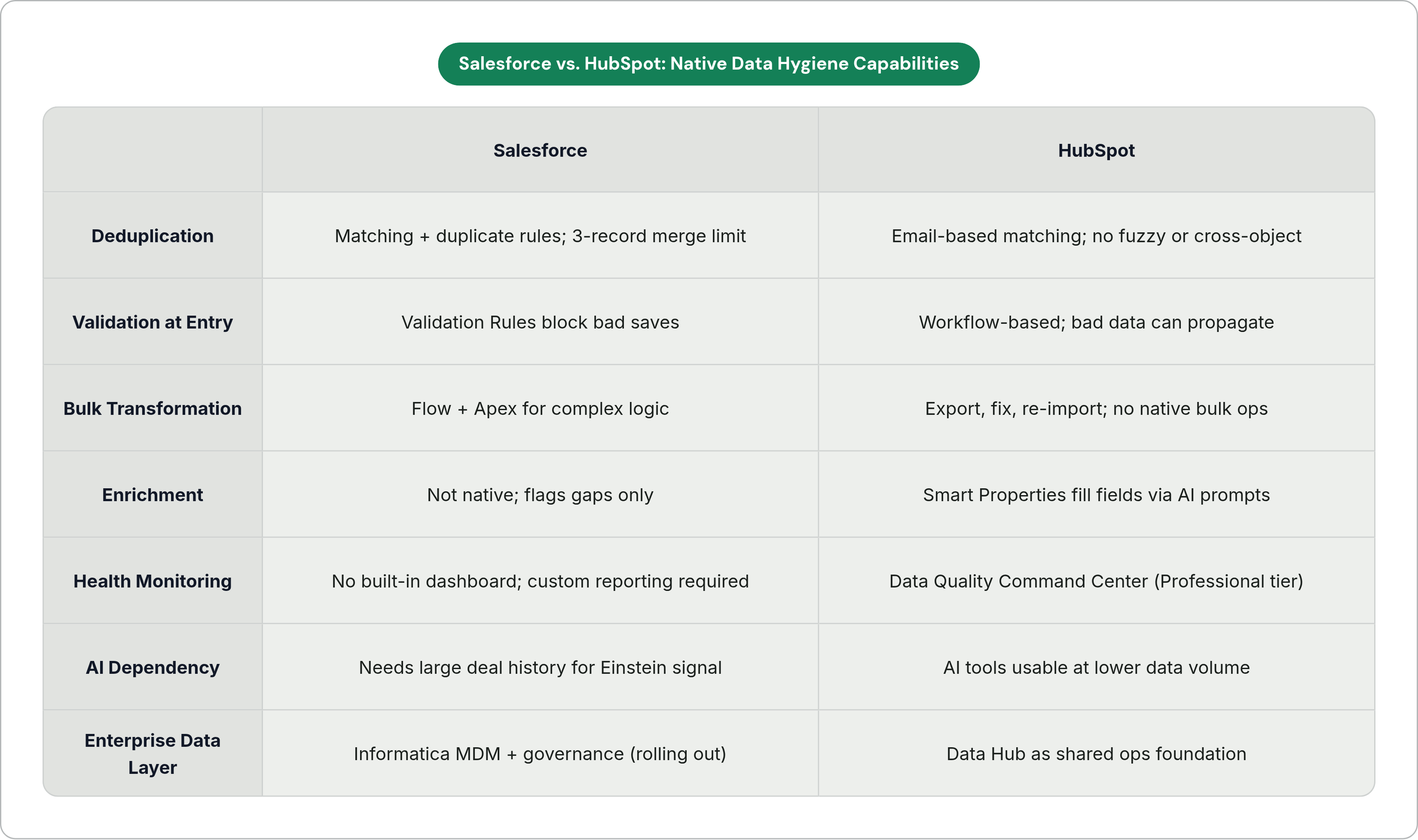
Line the two platforms up side by side and a pattern shows up fast.
Depth versus speed. Salesforce goes deeper: Flow, Apex, and now Informatica-backed MDM behind it. That depth costs configuration time, and often a developer on payroll. HubSpot gets you moving faster, and a non-technical admin can run it without help. But the ceiling for complex or high-volume hygiene work sits lower once you're past what the native tools do.
AI thresholds. Salesforce's Einstein predictive features need real volume of historical deal data before they're worth trusting, which leaves smaller or newer teams waiting on the sidelines. HubSpot's AI tools, Smart Properties included, run at lower data thresholds. Usable earlier, even without years of CRM history stacked up behind you.
Monitoring posture. This is the sharpest difference between the two. HubSpot's DQCC gives you a visible, trackable data health number you can watch move up or down like any other dashboard. Salesforce's native tools are reactive: a duplicate alert here, a validation block there, with no built-in view of overall data health. Getting that in Salesforce means building custom reporting yourself, or bringing in a third-party tool to do it.
One thing both platforms share, and it's easy to miss: automation only runs on whatever data already exists. Bad data keeps spreading on both platforms when validation rules were skipped before the records got in the door. Automation isn't a substitute for that upfront discipline. It's a multiplier on whatever discipline, or lack of it, was already there.
Plenty of organizations run both platforms side by side these days, and the HubSpot–Salesforce integration has gotten noticeably better in recent product cycles: bidirectional workflow automation, lead routing, campaign enrollment off cross-platform data. Guided setup now, not a six-week custom integration project.
Third-party tools that fill the gaps both platforms leave
When native tooling runs out of road, a specific set of third-party tools tends to pick up the slack.
- Bulk deduplication. Cloudingo and Plauti are built for merge operations well past what Salesforce's three-record native UI can handle. DemandTools covers cross-object matching scenarios that standard duplicate rules miss entirely.
- Real-time contact verification. External enrichment and verification services check email addresses and contact data as they enter the system, or on a rolling basis afterward. This matters a lot for outbound, where high bounce rates wreck sender reputation and can tank future delivery altogether.
- Refresh cadence tools. Some enrichment services run tiered re-verification: active pipeline contacts checked roughly monthly, nurture lists on a longer cycle. This solves a problem neither Salesforce nor HubSpot watches on its own: decay keeps happening even after last quarter's cleanup project wrapped up.
- Workflow and administrative automation. Tools that sit alongside the CRM handling the admin layer, drafting follow-ups, logging call outcomes, updating deal stage fields, capturing next steps, cut down on the blank or wrong-at-entry records that manual rep data entry creates in the first place. Some tools work this layer, running alongside the inbox, calls, and CRM to auto-draft replies, log updates, and capture next steps. They plug into both Salesforce and HubSpot without asking reps to switch tools or type data in by hand, which hits the blank-field and wrong-field problem at the source.
These tools sit next to what Salesforce or HubSpot already does, picking up roughly where the native tooling gives out.
Building a hygiene automation stack that doesn't require constant manual rescue
Start by matching the tool to the problem, not the other way around. Deduplication, enrichment, validation, normalization, monitoring: five different jobs. No single feature, however good, does all five at once.
Use native tooling for what it's built for. Salesforce's validation rules and Flow, HubSpot's Workflows and Data Hub, handle prevention and everyday maintenance well. Save the bulk remediation on a database with hundreds of thousands of stale records for something else.
Bring in third-party tools where the platform runs out of road, and do it before the AI rollout, not after. If Einstein or Agentforce is on the roadmap, the data needs to be clean before the agent starts acting on it, not cleaned up in a panic three weeks later once someone notices the agent is doing something weird.
Track hygiene like a number you check, not a project you finish. HubSpot's DQCC gives you that visibility out of the box. Salesforce teams have to build it themselves, or lean on Informatica-derived tooling as it rolls out. "We did a data cleanup in Q1" isn't a strategy. A number you look at every week is.
Dirty data isn't an event you clean up once and move on from. It keeps happening, quietly, in the background, whether anyone's watching or not. The teams that stop needing constant manual rescue aren't the ones with the cleanest database today. They're the ones who built something that keeps it clean tomorrow, and the week after that, without anyone having to remember to check.