AI Email Drafting Tools for Sales Reps Compared
The real productivity gap comes down to deal context, CRM sync, and tone.
This piece is about AI email drafting tools built for sales reps, and the thing worth knowing up front: fluent writing is the easy part. Every tool on the market can produce a grammatically clean email. What separates the ones that actually save reps time from the ones that just look impressive in a demo comes down to three things: whether the tool knows where a deal actually stands, whether it talks to your CRM without you doing the talking, and whether it sounds like you instead of sounding like AI.
Here's why that matters more than it sounds like it should. Bain & Company's 2025 research puts sellers at roughly 25% of their working hours on actual selling. Salesforce's State of Sales data lands in the same neighborhood, 28 to 30%. Everything else, the admin, the CRM updates, the digging through old threads to remember what you told a prospect three weeks ago, eats the rest.
Now put a number on that. A fully loaded SDR costs a company somewhere around $139,000 a year. If that person is only selling a quarter of the time, you're paying six figures for a job that's three-quarters something else. AI email drafting sits right in that gap. But it only closes the gap if it's actually solving the right problem. A tool that writes a nice sentence faster doesn't touch the admin pile at all.
So which tools actually reclaim that time, and how do they stack up against each other? Let's get into it.
What the productivity numbers actually show — and what they hide
The adoption numbers alone are wild. 56% of sales pros now use AI daily, up from 24% in 2023. That's a 133% jump in two years, which is the kind of growth curve you usually see in gadgets, not workflow software.
The time-savings numbers are where it gets murkier. 38% of reps say they save 4 to 7 hours a week. ZoomInfo surveyed more than 1,000 go-to-market professionals and landed on an average of 12 hours saved weekly. HubSpot's 2024 numbers put 64% of reps at one to five hours saved through automation. That's a wide band. One survey says half a workday, another says a workday and a half. Something is driving that gap, and it's not just how people define "saved."
On the output side, Outreach's 2025 data shows AI-powered campaigns getting 57% higher open rates and 82% more responses than non-AI campaigns. That's a real number worth paying attention to.
But here's the catch with all of this: these surveys lump every kind of AI tool into one bucket. A coaching overlay that tweaks your subject line gets counted the same as an all-in-one platform that runs your entire sequence, which gets counted the same as someone pasting a prompt into a general chatbot. That's like averaging the fuel efficiency of a bicycle and a pickup truck and calling it "transportation savings."
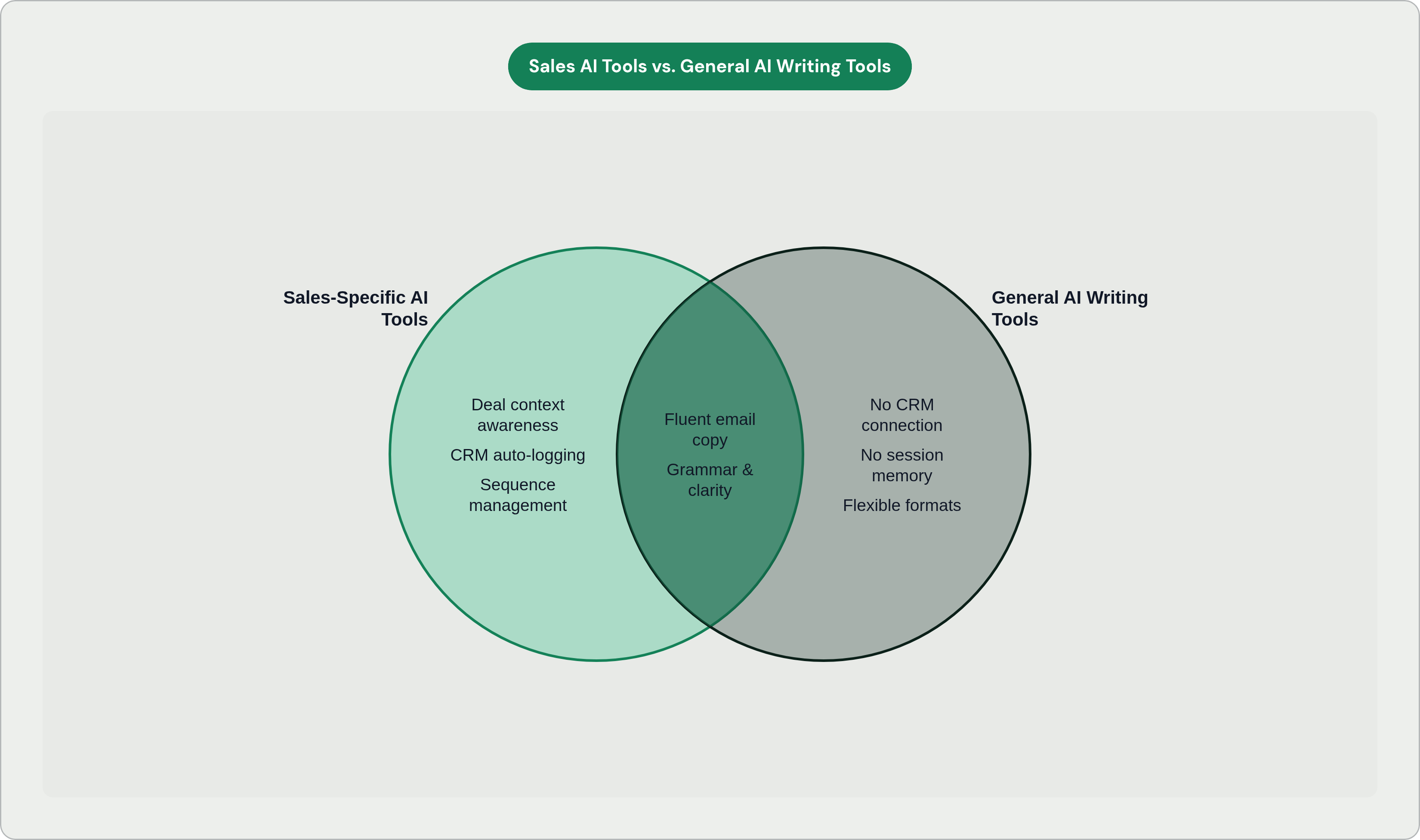
The variable hiding underneath all these stats is context. Tools that know where a deal stands, and can act on that knowledge, save real time. Tools that just write fluent sentences save you the trouble of typing, and that's a much smaller win. Before we can compare specific products, we need a lens for telling those two things apart.
The three dimensions that separate sales-specific tools from general writing assistants
Three questions get you most of the way there.
Dimension 1: Deal context awareness. Does the tool know where this prospect sits in the funnel? Can it pull from CRM fields, past call notes, the last three emails in the thread? Or does it need you to paste all of that in yourself? If you're doing the pasting, you haven't eliminated admin work. You've just relocated it.
Dimension 2: CRM integration depth. Logging a sent email to a contact record. Updating a deal stage. Booking the follow-up. These are small tasks individually, and they're the exact tasks that quietly eat a rep's day. A shallow integration, the kind built on copy-paste or a Zapier workaround, just hands that burden back to you with extra steps. Native, two-way sync with Salesforce or HubSpot is a completely different animal from a connection that only pushes data one direction.
Dimension 3: Tone and context learning. Here's a test: does the email still read like a template even after the AI pulls someone's LinkedIn headline into it? "Hi [First Name], I noticed you..." is generic no matter how much data went into filling the blank. The tools worth using learn from a rep's sent history, or a company's actual messaging, or the specific back-and-forth of a live deal. That's the difference between a tool you have to instruct every single time and one that remembers what it already knows about you and the deal.
One more thing worth flagging: where does the tool actually live? Inside your inbox? A separate browser tab? Its own platform you have to log into? That's not a dealbreaker on its own, but it shapes how much friction gets added to your day, which is the whole point of using AI in the first place.
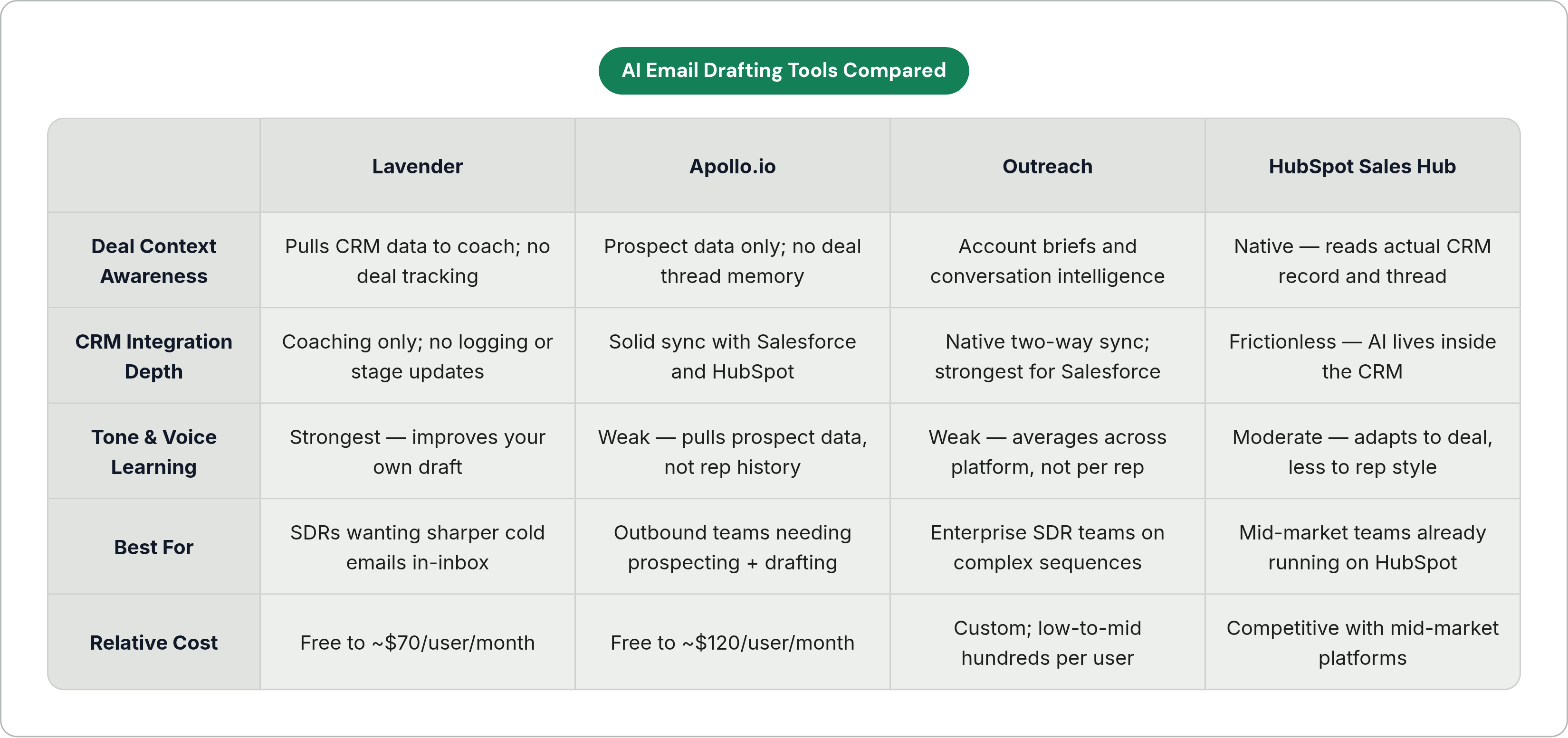
These three dimensions are the scorecard for everything that follows.
How the tool landscape is actually structured
Once you apply that scorecard, the market sorts itself into three fairly distinct categories.
Category A: Real-time coaching overlays. These live inside Gmail or Outlook. They score your draft and suggest fixes as you type. They don't send anything and they don't run sequences. Lavender is the clearest example here. The strength is obvious: zero friction, no new platform to learn, you're still working in the inbox you already know. The limit is just as obvious: they make your draft better, but they don't get rid of the drafting task, and they definitely don't touch the logging task.
Category B: All-in-one sales engagement platforms. Think Outreach, Salesloft, HubSpot Sales Hub, Apollo.io, Reply.io. These bundle sequencing, AI drafting, CRM sync, and analytics into one product. The strength is end-to-end ownership: prospect, draft, send, log, analyze, all in one place. The tradeoff is weight. These are heavier to set up, cost more, and can be more tool than a five-person team actually needs.
Category C: General AI writing tools adapted for email. ChatGPT, Gemini, Microsoft Copilot in Outlook, Jasper. These are flexible and genuinely good at producing fluent copy in any format you ask for. But they have no native CRM connection, no memory of deal context, and no persistent sense of tone. You re-establish everything, every session. The rep ends up doing all the context work by hand.
One stat ties this together: 79% of sales teams say they've already worked AI into their process. The real question isn't whether to adopt AI at this point. It's whether the category a team picked actually matches how they work. Let's look at the individual players.
Lavender: real-time coaching that sharpens what the rep already writes
Lavender scores every email from 0 to 100 and gives you specific, real-time fixes right inside Gmail or Outlook. Many tens of thousands of sales professionals use it, at companies like Zoom, LinkedIn, and HubSpot.
Its personalization engine pulls from LinkedIn profiles, past email threads, and CRM data to flag where an email could get sharper. Lavender's own benchmark, run across hundreds of thousands of cold emails, found A-graded emails get a meaningfully higher reply rate. Results vary a lot by team. One team reported far more meetings booked in a single month, which is a great result, though obviously not a guarantee.
Worth watching: Lavender rolled out an agent called Ora in 2026, which researches prospects and writes cold emails on its own, priced separately from the core product. That's a real shift, from coaching what you write toward writing it for you. Pricing runs from free (5 emails a month) up to around $70 per user per month for teams that want shared analytics.
Where it scores well: Tone learning is strong, since it's improving your draft rather than replacing your voice with something generic. And it lives where you already work, so there's no platform switch.
Where it falls short: Deal context is thin. It pulls CRM data to inform coaching, but it doesn't log anything or update a deal stage on its own. There's also a real risk of reps optimizing for the score itself. A 95 isn't automatically a good email, it's just an email that hit Lavender's checklist. Junior SDRs tend to see the biggest gains; senior reps sometimes find the suggestions more restrictive than helpful. And you'll still need a separate tool to actually run sequences.
Best fit: SDRs and individual reps who want sharper cold email quality without abandoning the inbox and sequence tool they already use.
Apollo.io: prospecting database plus AI drafting in one platform
Apollo's foundation is its database, hundreds of millions of contacts and tens of millions of companies, with AI layered on top for prospecting, sequencing, and drafting.
AI Research pulls talking points from LinkedIn, company news, and general online presence. AI Writing then turns that research into draft copy and subject lines. In March 2026, Apollo pushed out an AI Assistant upgrade that runs agentic workflows off natural language prompts, and Apollo reports users who engage with it are 36% more likely to book a meeting in their first 14 days. Worth noting that's Apollo's own figure, so treat it as a signal, not an independent benchmark.
On quality: the output is a solid first draft, but it tends to read like other AI-generated cold email. Experienced SDRs often end up rewriting a good chunk of it. The personalization pulls in variables, but it isn't learning your voice or tracking an ongoing deal's conversation history.
Pricing in 2026 runs from a free tier up to roughly $50 to around $120 per user per month annually, well under enterprise pricing. One thing to flag: data accuracy sits in the high eighties percentagewise in the US and drops in international markets, which can quietly affect deliverability and sender reputation if you're not watching it.
Where it scores well: CRM sync with Salesforce and HubSpot is solid, and sequences log activity automatically. Prospecting and drafting live in one product, so there's no tool-switching mid-workflow.
Where it falls short: Tone learning is weak, since context comes from the prospect's data, not from your writing history or the deal's own thread. It's also built more for top-of-funnel outbound than for mid-funnel follow-up tied to a specific deal's state.
Best fit: Outbound-heavy teams that want prospecting and sequencing together without enterprise pricing or a dedicated RevOps person to run it.
Outreach: enterprise sequencing with AI layered across the full sales cycle
Outreach is built for complex, multi-touch sales cycles at scale. Its AI suite covers sequence generation, email rewriting, live conversation intelligence (Kaia), AI-generated account briefs, and coaching analytics for reps.
The AI's sequence recommendations, which suggest send times, follow-up intervals, and messaging approach based on aggregated performance data across the platform, go beyond drafting into actual workflow strategy. That's a meaningfully different job than writing a sentence for you.
The email copy itself is a decent first draft that needs human editing. The real strength is the sequencing logic and timing, not the prose. Pricing is custom, generally in the low to mid hundreds of dollars per user per month, and it's not really built for teams under about five SDRs.
Where it scores well: CRM integration is particularly strong for Salesforce shops, with native two-way sync. Deal context at scale is a real strength, since account briefs and conversation intelligence feed directly into email suggestions. It also holds up well on enterprise security and compliance needs.
Where it falls short: Tone learning at the individual level is weak. The recommendations come from data-driven averages across the platform, not from any one rep's actual voice. And the cost and setup complexity put it out of reach for smaller teams.
Best fit: Enterprise sales orgs running large SDR teams, complex multi-touch sequences, with Salesforce as the system of record.
HubSpot Sales Hub: AI drafting for teams already living in HubSpot's CRM
HubSpot's approach is different by design: the AI lives inside the CRM instead of next to it. Contact history, deal stage, and prior email threads are already sitting there, no integration required.
It generates email suggestions based on contact properties, deal stage, and conversation history, and subject line suggestions draw from engagement data across HubSpot's broader install base. Because the AI is reading the actual CRM record and thread, follow-up emails can reference earlier conversations without you pasting anything in first. Outreach's 2025 data shows 54% of teams actively using AI to write personalized outbound emails, and HubSpot is one of the main platforms driving that number in the mid-market.
The catch: this advantage mostly evaporates if your system of record is Salesforce instead. HubSpot's AI is strongest exactly when HubSpot is both your CRM and your email tool, and weaker the moment it isn't.
Where it scores well: Deal context is native, so the AI knows the deal state without being told. CRM integration is as frictionless as it gets, because it is the CRM. It's also priced well relative to the enterprise platforms.
Where it falls short: Tone learning adapts to the contact and the deal, but it's less adaptive to an individual rep's writing style over time. And it's not a prospecting database, so you'll need a separate source for new contacts.
Best fit: Mid-market teams already running on HubSpot who want AI drafting without adding another platform to the stack.
General AI writing tools: where they help and where they leave reps doing the work
ChatGPT (GPT-4o), Google Gemini, and Microsoft Copilot inside Outlook all write fluent, well-structured email copy. On pure prose quality, they can hold their own against anything on this list.
But here's the ceiling, and it's a hard one: none of them have native CRM integration. None of them carry deal context from one session to the next. None of them log an activity or book a follow-up. Every time you sit down to write, you're the one pasting in the prospect's background, the deal stage, the last email thread, and the tone you want. Every single time.
That setup work is itself a form of admin. It might take less time than writing the email from scratch, but it's not nothing, and it doesn't scale the way a tool with actual memory does. For a one-off email, that's a fine tradeoff. For the volume a working sales rep needs to hit day after day, it starts to look a lot like the admin problem we started with, just wearing a different hat.
Which brings us back to the real question this whole comparison is built around: it was never really about which tool writes the prettiest sentence. It's about which tool remembers what you already know, so you don't have to keep telling it.