AI Prompting Strategies for Sales Reps Without Prompt Engineering
Simple structure separates reps who hit quota from those who don't.

81% of sales reps used AI at least occasionally in 2025, up from 54% in 2024 and 24% in 2022, according to Salesforce's State of Sales report. Real number. Not really the point, though.
Here's the actual point: most reps type something vague into a chatbot, get back an email that's fine, technically, and utterly forgettable, and shrug like that's just the ceiling for AI output. HubSpot's 2025 numbers put it at 19% of reps using the AI features already built into their sales tools. Everyone else is pasting deal info into a general chatbot and crossing their fingers. You've probably done this. I know I have, more than once, usually at 11pm with a deal I should've prepped for that morning.
The model isn't broken. Vague in, vague out, every single time. Nobody ever sat these reps down and showed them a better way to ask for things. So let's do that part.
What "prompt engineering" actually is and why reps don't need it
Can we retire that phrase, or at least take the teeth out of it? "Prompt engineering" sounds like something you'd need a CS degree for, and in its real, technical sense, kind of is. That's research-lab work: people writing systematic instructions to control a model's behavior at an architectural level.
What a rep needs is much smaller. Give the AI a role, some context, a few limits. That's it. No syntax, no background required.
Think of the difference between building Excel and knowing how to write a VLOOKUP. Somebody engineered the software. You just need the formula that saves you twenty minutes before your next call. Driving well doesn't require understanding the engine.
So why doesn't everyone already do this? Workday and Salesforce turned up something a little odd here: 69% of business leaders think their company is at least moderately AI fluent, but only 28% of employees actually feel confident using generative AI tools. That's a nobody-ever-showed-me gap, not a skills gap. Most reps have never once seen a genuinely good sales prompt, written out, in front of them.
Worth chasing down, because Gartner found sellers who use AI effectively are 3.7 times more likely to hit quota than the ones who don't. That's the number that decides whether you make the number. Hardly a rounding error.
And what separates those reps isn't some clever trick. It's structure. Small, boring, repeatable structure, used the same way every time.
The six elements that make a sales prompt actually work
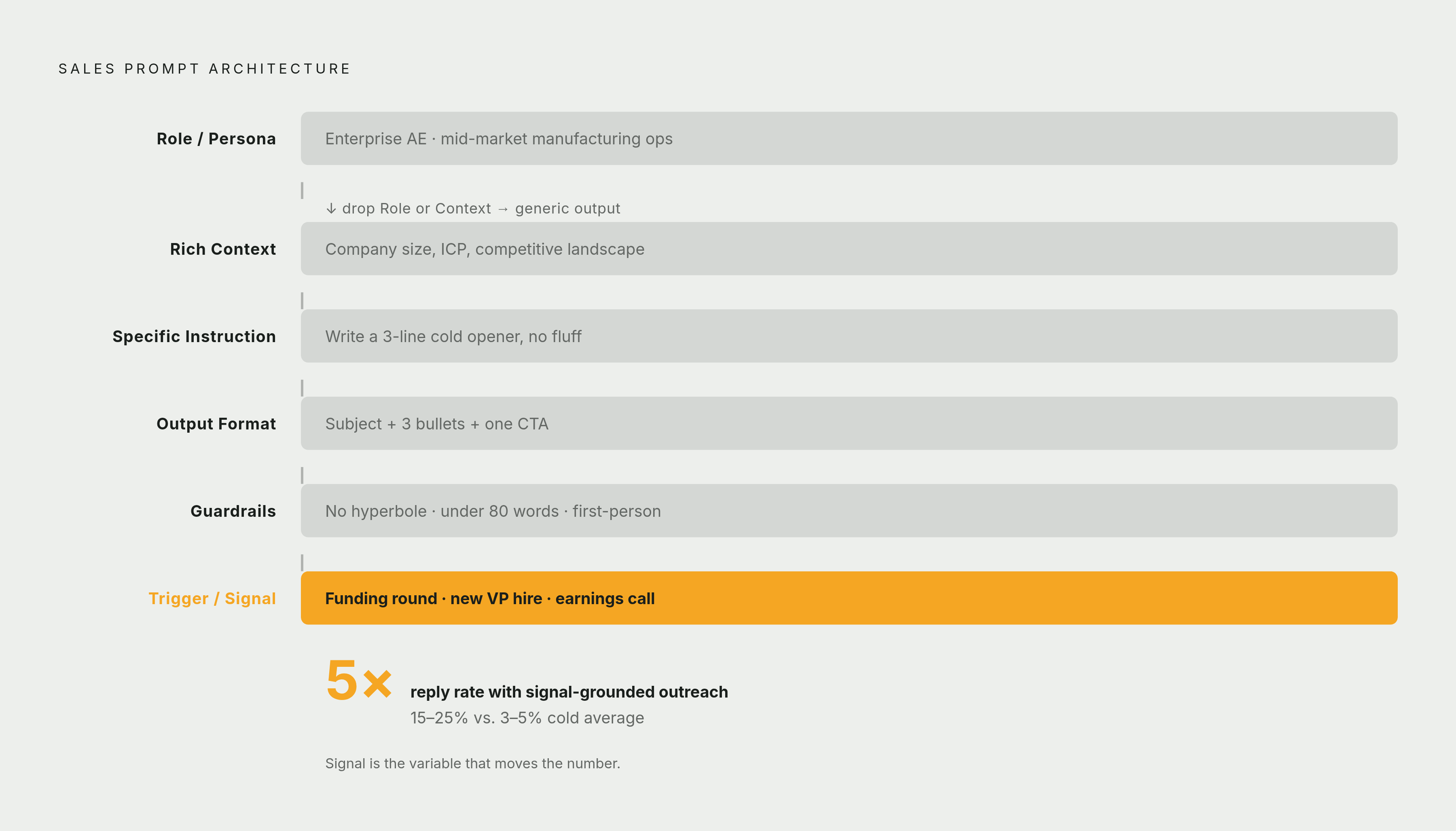
Look across enough practitioner playbooks, Kixie, ZoomInfo, Spotio, Silotech all land in roughly the same place, and six ingredients keep showing up. Not all six every time. But leave out the wrong one and you'll feel it in the output immediately.
Role or persona first. Tell the model who it is. "You are an enterprise AE at a SaaS company selling to mid-market manufacturing ops teams." Skip this and you get the same flat voice already sitting in everyone else's inbox.
Rich context is the one reps skip most, and it costs the most. You know the buyer, the deal history, the thing that came up on last week's call. The model knows none of it unless you paste it in. Drop in the LinkedIn headline, the press release, the objection from Tuesday. Context is the whole difference between a form letter and something that sounds like a person wrote it.
Then a specific instruction, not a vague task. "Write a cold email" is a task. "Write a 120-word cold email that opens with their Q3 supply chain problem and ends with one calendar link" is an instruction. Give it a word count. Tell it what to include and what to leave out.
Output format matters more than it seems like it should. Skip it and you'll spend as much time reformatting as you'd have spent writing the thing yourself. Say the shape out loud: "three-bullet objection cheat sheet," "subject line plus two short paragraphs," "five subject lines, numbered."
Guardrails: tell it what not to do. No pricing mention. No jargon. No naming competitors. Under 150 words. This is the difference between output you can send as-is and output you have to scrub line by line.
And last, a real trigger or signal. For outreach, ground the prompt in something that actually happened: a funding round, a new VP, a line from an earnings call. This one matters more than it should. Signal-personalized outreach gets 15 to 25% reply rates against a 3 to 5% industry average for cold, ungrounded email (Instantly 2026, Belkins 2025). Call it a five-times lift. The signal is what makes your timing feel earned instead of random.
You don't need all six every time. But drop role and context specifically, and that's usually where things go generic and stay there.
Four prompting frameworks that structure these elements without overhead
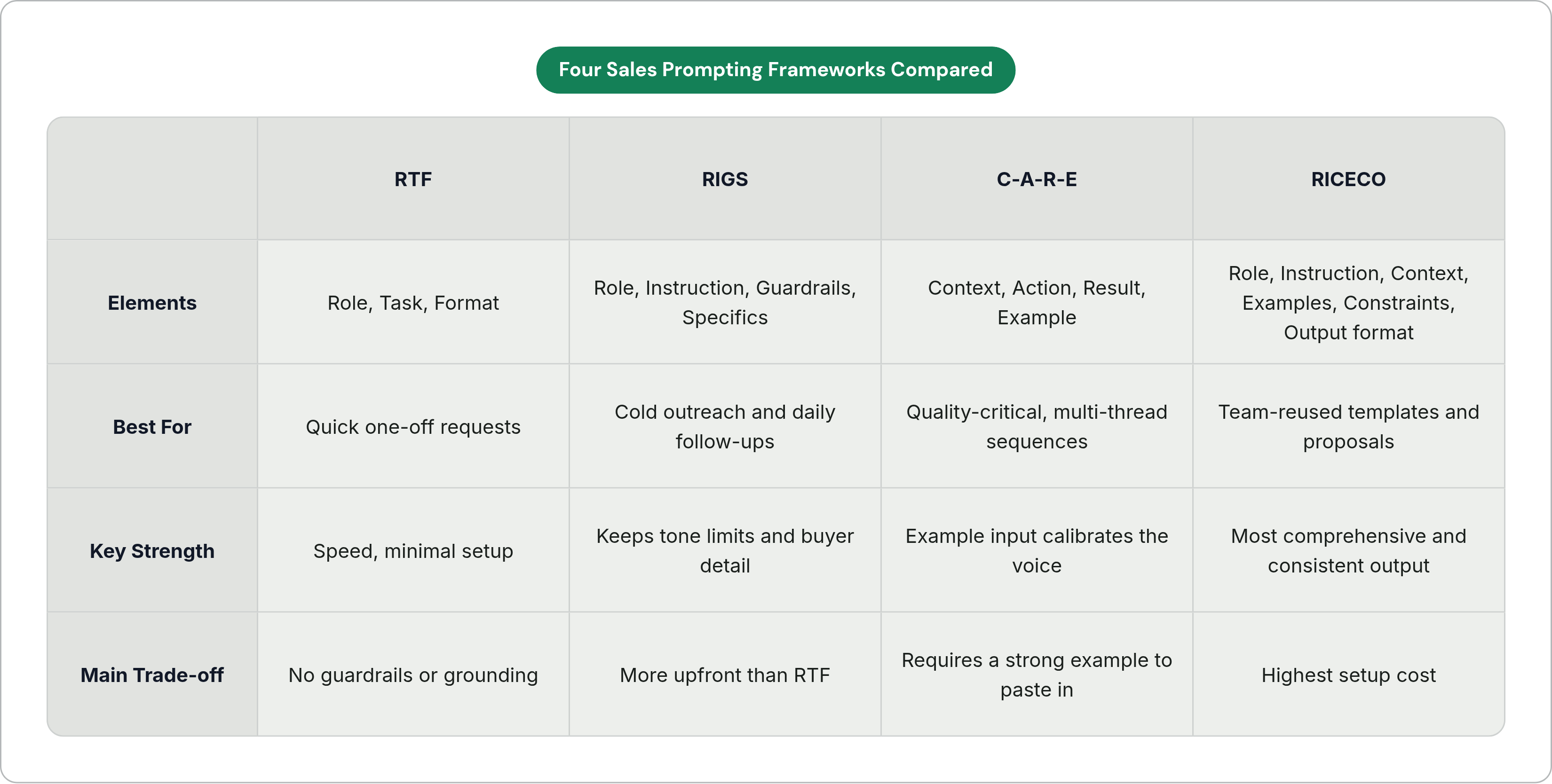
You don't need to hold six elements in your head every time you open a chat window. That's what a framework is for. Different tools for different jobs, not a ladder to climb, just a toolbox to reach into.
RTF (Role, Task, Format) is the fast one. "Act like a [role]. Give me a [task] in [format]." Good for a quick prospecting email or a one-off research question. No guardrails, no grounding signal, so keep it to low-stakes stuff.
RIGS (Role, Instruction, Guardrails, Specifics) is probably the most sales-native of the four, because it keeps the constraints and buyer detail that RTF drops. Use it for cold outreach, follow-up sequences, call prep, anywhere tone and limits actually matter.
C-A-R-E (Context, Action, Result, Example) adds something the others don't: an example of what "good" looks like. That one addition is usually what saves you three or four rounds of back-and-forth. Paste your best-performing email in as the Example, and the model calibrates to that instead of guessing at your voice. Good for deal strategy and multi-thread sequences, anywhere consistency actually matters.
RICECO (Role, Instruction, Context, Examples, Constraints, Output format) is the full six-element structure above, bundled into one name. Most upfront work, most comprehensive. But it pays for itself once it's reused across a team: proposal drafts, objection libraries, post-call templates.
Rough rule of thumb: RTF for speed, RIGS for the daily grind, C-A-R-E when quality is the whole point, RICECO when you're building something the team will reuse.
Where these habits pay off most in a sales rep's actual day
Nobody wakes up thinking about "AI capabilities." You think about what's actually on your plate. So here's where this shows up, stage by stage, more or less in the order your day runs.
Prospecting and research: feed in a LinkedIn headline, a company description, a recent trigger event. Ask for a three-sentence situation summary and two likely pain points. RIGS fits well here, role as an AE in your vertical, instruction to summarize, guardrails on length, specifics from their public profile. This is about walking into the first call already informed instead of guessing out loud on the phone, judgment intact either way.
Cold outreach is where trigger grounding really earns its keep. Reference the funding round, the new VP, the priority they posted about last month. Remember that 15 to 25% versus 3 to 5%? That's the single highest-leverage habit on this whole list, by a wide margin. C-A-R-E fits well, with your best past email as the Example, so the model matches a voice that's already proven itself.
Meeting prep and call briefs: feed in the deal stage, known objections, who's in the room and their titles, what came up last time. Ask for a one-page brief with likely questions and suggested responses. LinkedIn's 2025 numbers put daily AI users at 56% of sales pros, and those daily users are twice as likely to hit target. Meeting prep is probably doing a fair amount of that lifting.
Objection handling: try this one directly. "Here's the objection, word for word. Here's our positioning on [topic]. Give me three responses: one direct, one that reframes, one that asks a clarifying question back." Add a guardrail (skip conceding on price, skip naming the competitor), keep it numbered. You want options to grab mid-conversation, not a paragraph to read while the prospect waits on the other end of the call.
Post-call follow-ups and CRM updates: paste in your notes or a transcript excerpt. Ask for a summary of commitments, next steps, and a draft follow-up. This is the real time-saver, reps spend roughly 19% of the workday just on CRM updates. One guardrail worth keeping permanently: "flag any commitment I made that isn't addressed in this draft." That line catches the dropped ball before it turns into a dropped deal.
Proposals and deal summaries: RICECO earns its overhead here, since the output needs to be consistent, not a one-off. Feed in the buyer's stated priorities, deal stage, product, pricing tier. Ask for an executive summary written in the buyer's language, not your internal shorthand.
How to turn one good prompt into a personal library that compounds over time
Quick question, and be honest with yourself here: what happens to a great prompt after you use it once?
If the answer is "nothing, I just retype something close to it next time," you're throwing away value that's already paid for. A prompt that worked once is a template. Strip the deal-specific details out, keep the shell (role, instruction, guardrails, format), save it somewhere. Now it's a reusable asset instead of a trick you half-remember at 11pm.
Organize by motion. One folder per stage: prospecting, outreach, prep, follow-up, proposals. Two or three tested prompts in each. Doesn't need to be fancy. Just needs to be findable when you're in a hurry, which, let's be honest, is most of the time.
Treat every output the way you'd treat a call debrief. What worked? What did you have to edit out, and why? Refine the template off that, not off vibes.
It compounds fastest as a team thing. A shared library kills the "who's got the good cold email template" scavenger hunt every sales org seems to run, and it gets new reps productive faster than an onboarding deck ever will.
One catch worth being honest about. Gartner's 2026 research found AI saves sellers an average of 4.8 hours a week. But 72% of sales orgs never reinvest that time into anything that actually matters, it just gets found and then evaporates into more Slack messages. A library is what turns that reinvestment into a decision instead of an accident.
And a library's only as good as the specifics behind it: the verticals you actually sell into, the personas you actually pitch, the objections you hear over and over, on repeat, week after week.
Where context-aware tools make manual prompting optional
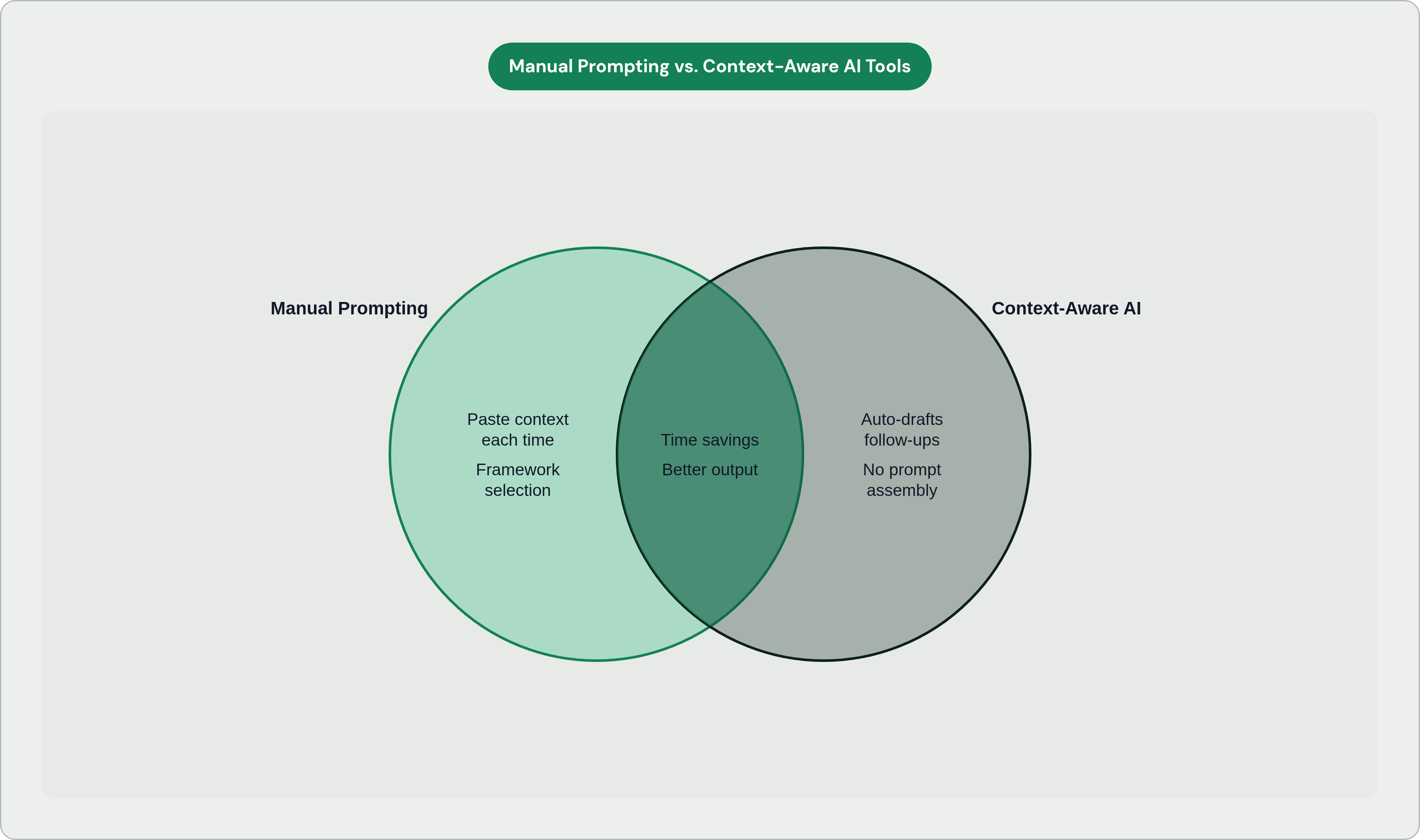
Manual prompting, done with the habits above, is genuinely high-leverage. But there's a catch sitting quietly in every example so far: you have to gather the context and paste it in, every single time. Fast work. Still work.
The next step is AI that already has the context because it lives inside the tools you're already using. That 19% of reps using AI features built into their sales tools (HubSpot 2025) are the early edge of exactly this. They're not assembling anything by hand. The CRM data, the email thread, the last call note, it's already sitting there, waiting.
In practice, that looks like AI reading the thread, the deal stage, the last call note, and drafting the follow-up without anyone typing a prompt at all. Nextstep is built around this exact motion. It runs alongside the inbox, the calls, the CRM, drafting replies, logging updates, booking next steps on its own, and it learns the rep's tone and deal context so the output is useful without anyone having to engineer a prompt for it.
Worth saying plainly: these two things aren't rivals. Good prompting instincts make any tool sharper, context-aware ones included, because you already know what good output looks like when you see it. Purpose-built tools just remove the part where you're manually re-gathering context every single time you sit down.
The upside is real. Research from syncgtm.com in 2026 put AI's time savings at 5 to 18 hours a week when it's deployed across CRM, meetings, research, and outreach together. But the catch from the start of this piece hasn't gone anywhere: all that time only gets saved if the AI has enough context to produce something worth sending.
So what's this all actually for? Turning reps into AI experts was never the goal, nobody needs that particular credential. The point was always more time on the relationship and the deal, less time on the admin sitting around it. Manual habits get you there. So does a tool that already has the context loaded when you open it. Either way works. Just pick one and actually start.