B2B Sales Tech Stack Audit and Rationalization Framework
Consolidate overlapping tools to cut hidden costs and reclaim rep selling time.

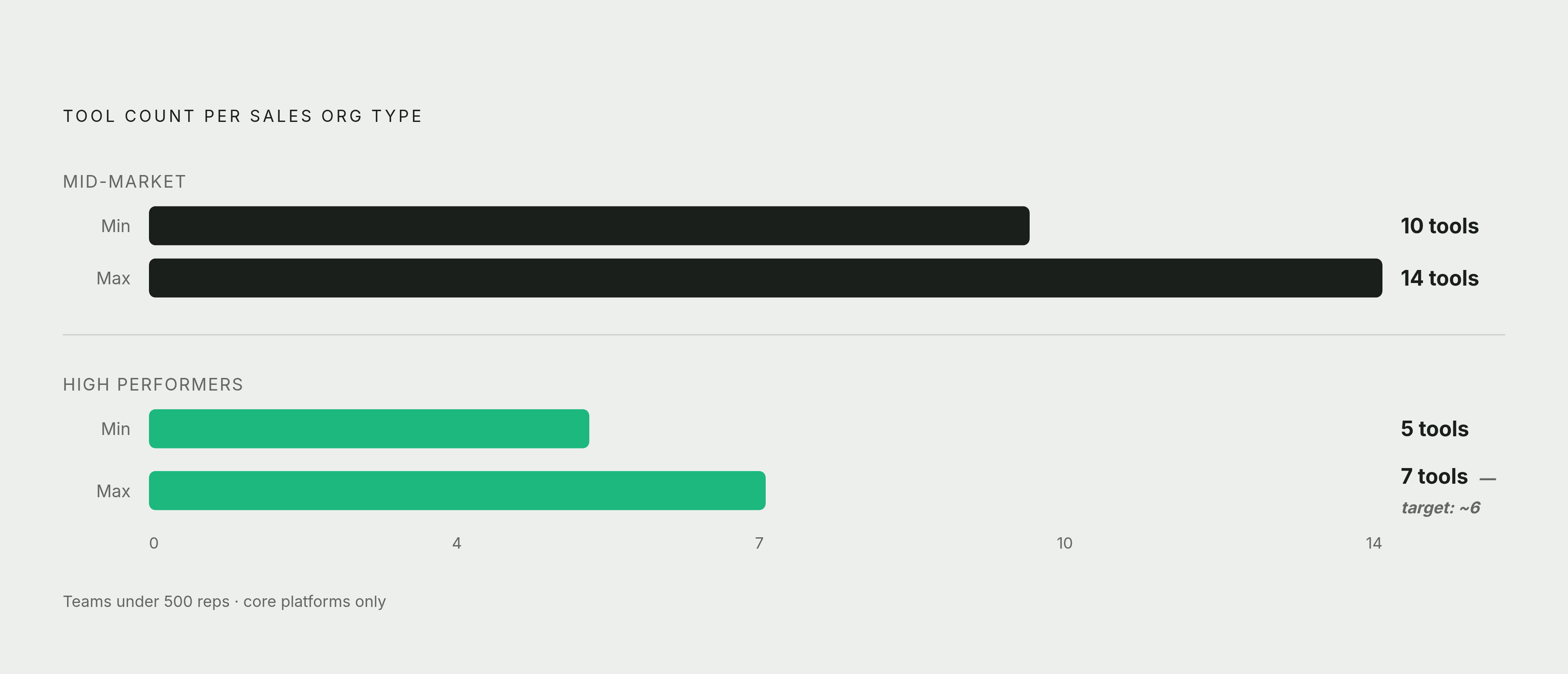
The martech solution universe reached 15,384 tools in 2025. No sales team could evaluate that landscape even if evaluating landscapes were their whole job. It isn't. Their job is selling. The average mid-market B2B sales team runs 10 to 14 tools, the average seller uses 10 different sales tools daily, and 66% of reps say they feel overwhelmed navigating all of it. That's a structural problem, and this article is a framework for fixing it: how to audit what you actually have, measure what's actually used, and consolidate down to a stack that helps reps sell instead of managing the stack itself.
Almost none of those 10 to 14 tools were bad purchases. Each one solved a real problem the day someone bought it. The CRM solved a record-keeping problem. The sequencer solved an outreach problem. The intent data platform solved a targeting problem. Nobody sat down and designed a 12-tool stack on purpose. It accumulated, one good decision at a time, until the sum of good decisions became a bad system.
The old high-performer story was "more coverage, more tools, more capability." The new one is fewer platforms, deeply connected, doing more per tool. Consolidation isn't belt-tightening anymore. It's the competitive posture. An audit isn't a cost-cutting exercise wearing a disguise. It's how you find out what you're actually working with before you make any decision at all.
What tool sprawl actually costs, beyond the subscription line
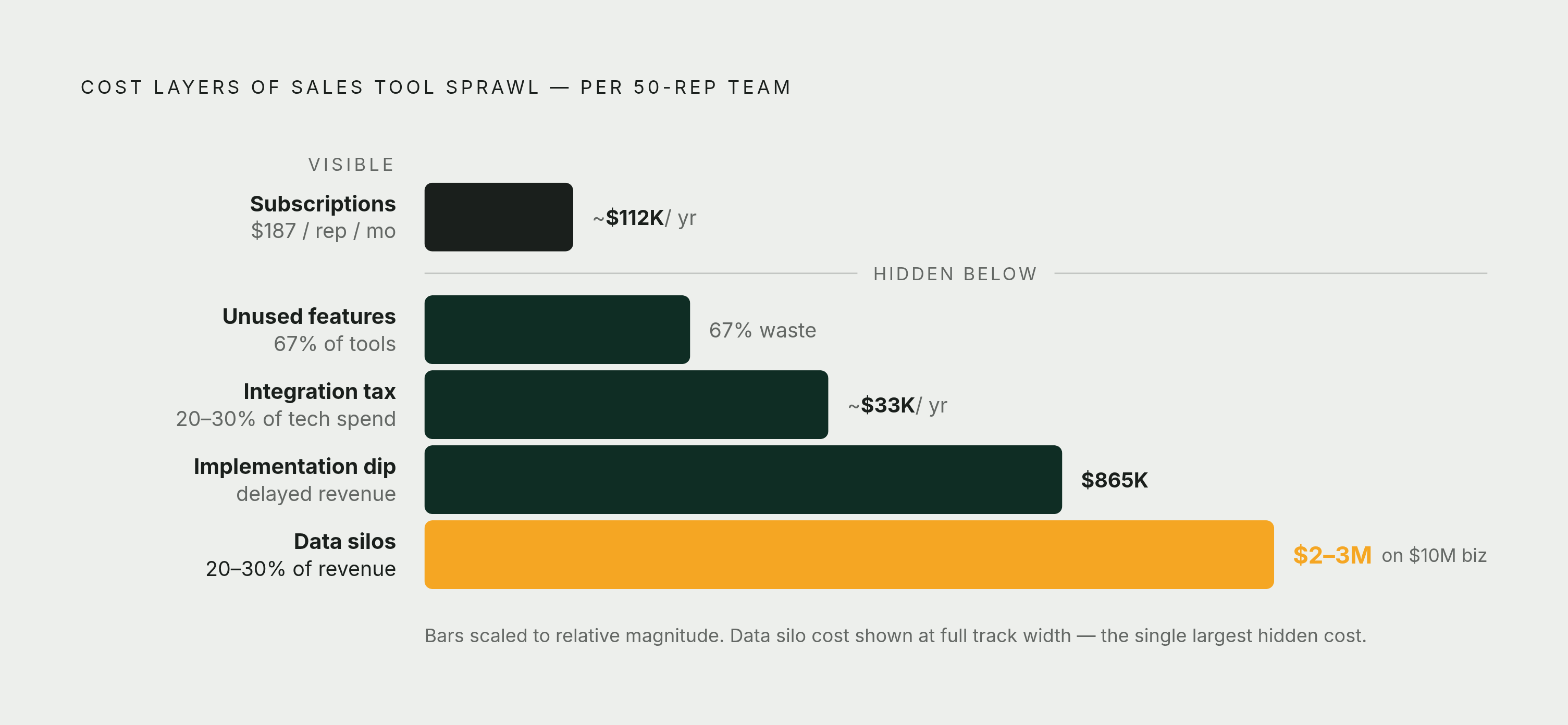
Start with the number everyone can see: organizations running 8.3 tools per SDR are paying roughly $187 per rep per month in subscriptions. That's the invoice. It's also usually the smallest part of the bill.
Revenue Velocity Lab looked at 938 B2B companies between Q1 and Q3 of 2025 and found that 73% of teams were wasting $2,340 per rep, per year, on tools that overlap with something else they already own.
Then there's the feature you paid for and never touched. Apollo.io and Gartner's 2025 research found 67% of purchased features go unused. You're paying for capability that sits there.
Add the integration tax. Keeping tools connected to each other, syncing data, patching broken workflows, running maintenance, often eats 20% to 30% of total tech spend. That cost rarely shows up as its own line item on a budget review. It's buried in ops hours, IT tickets, and "why doesn't this sync anymore" Slack threads.
Data silos are a quiet killer. Fragmented data across disconnected tools costs companies 20% to 30% of annual revenue. For a $10 million business, that's $2 to 3 million walking out the door because two systems don't agree on what stage a deal is in.
Then there's the implementation dip. Every new tool creates a temporary productivity hole while people learn it. A six-week dip at 30% reduced output, for a 50-rep team averaging $500K quota, works out to roughly $865,000 in delayed revenue. Every tool bolted onto the stack risks this cost. Every tool removed without a plan risks it too.
Subscriptions, integration labor, bad data, lost rep hours, the dip: none of it lives on one invoice. That's why nobody notices the total until someone forces them to look.
How fragmentation steals selling time from reps
Reps spend only 28% to 30% of their time actually selling. The rest goes to data entry (9%), admin tasks (9%), internal meetings (9%), research (9%), and building quotes or proposals (10%).
McKinsey's 2024 research points at the cause: reps toggling between 10 different sales tools daily. Every tool switch is a context switch. Open the CRM, close it, open the sequencer, close it, open the call recorder, check the enrichment tool, back to the CRM to log what just happened. None of that is selling. All of it is required by the stack.
Reps who feel overwhelmed by their tech stack are 43% less likely to hit quota, according to MarketSource's 2024 research. Tool sprawl is a quota attainment problem with a dollar sign on it.
Data silos alone cost 12 hours a week of employee time — a day and a half of a five-day week spent reconciling systems that should already agree with each other.
Manual logging and fragmented updates degrade CRM data quality. Bad CRM data breaks forecasting. Broken forecasting requires manual correction. Manual correction burns more time. The cycle feeds itself.
Which is the whole argument for doing this audit in the first place. When reps stop toggling, stop drafting the same update in three places, stop re-entering data that already exists somewhere else, those hours go back into the pipeline. A rationalized stack is about giving reps their day back.
Step 1 — Build a complete inventory before touching anything
You can't fix what you can't see. Most stacks are half-invisible even to the people managing them, which is why step one is a full inventory, with as few exceptions as possible, before anyone talks about cutting a single tool.
For every tool, capture:
- Category (CRM, engagement, enrichment, forecasting, and so on)
- Annual contract value
- Number of licensed seats
- Renewal date
- Named owner. A person. Not "sales ops" as a department. A human being.
Now the part everyone skips: shadow IT. Procurement records only catch what went through procurement. They miss the tool someone bought on a team credit card, or the app an individual rep expensed because it solved their specific problem faster than filing a request. Pull from SSO logs and expense reports too, not just vendor invoices. This is usually where the real surprises live.
The output of this step is a one-page tool map. Everyone in the room looks at the same list. No decisions get made before this document exists, because every decision made without it is a guess dressed up as strategy.
Tools with no named owner are the first candidates for scrutiny, regardless of what they cost or how well they perform. If nobody owns it, nobody's accountable for whether it's working. That's often the fastest signal in the whole audit.
Assign this inventory job to someone who can see across finance, IT, and sales ops. A tool that looks essential from sales ops might look like dead weight from finance, and you need both angles at once.
Step 2 — Measure actual usage at the seat level, not license level
Now you know what you have. Next question: is anyone using it?
Gartner's 2025 benchmark sets a real line: if fewer than 50% of a tool's licensed seats show meaningful activity in the last 30 days, that tool is shelfware. This is the threshold, not a suggestion.
"Meaningful activity" matters as a phrase, because logging in isn't using something. A rep who opens a dashboard, glances at it, and closes it isn't a user. They're a login count.
The scale here is bigger than most teams assume. The average enterprise actively uses only 47% of its SaaS licenses, adding up to roughly $21 million in annual shelfware per organization. At the sales team level, seat-level waste often runs 30% to 50% of paid seats with zero log-ins in the last 60 days.
For each tool, pull:
- Active seat count over the last 30 days, using a meaningful-activity definition you set before you look at the data (so you don't bend the definition to fit what you find)
- Feature utilization, meaning which specific modules people actually touch
- Frequency distribution, meaning: are a small minority of reps generating the vast majority of the usage?
Low utilization tells you one of two very different stories.
Story one: the tool is redundant, or it was rolled out badly, and adoption never happened. That's a consolidation candidate.
Story two: the tool is specialized. Maybe it's only meant for enterprise AEs, and low usage is exactly what you'd expect because most of the team was never supposed to touch it. That's the tool working as designed.
The usage numbers are just evidence. What they mean is a separate question, and it's the question step three answers.
Step 3 — Map overlaps across the five core workflow categories
Take every tool in your inventory and plot it against five workflow categories: system of record, outbound engagement, data enrichment, meeting and conversation intelligence, and forecasting/pipeline analytics.
The rule: one tool per category at the core. If you find duplication inside a category, that's the signal you're looking for.
These are the overlaps that show up over and over once teams actually map this out:
- Two data enrichment providers pulling the same contact and company fields
- A sequencer, a separate LinkedIn tool, and a standalone email sender, all touching the same multi-channel motion
- An ABM platform and an intent data platform targeting the same accounts with no integration linking them
- A call recorder and a standalone forecasting tool, both duplicating pipeline analytics your CRM already does
The hardest question in this step is the system of record. Which CRM do your reps actually use? Not which one leadership picked in a boardroom two years ago. If reps aren't logging into it consistently, no other tool downstream will have clean data to work with. Everything else in the stack inherits the CRM's data quality, good or bad.
This step gets political fast, because overlap mapping names tools that someone on your team championed, budgeted for, and maybe still defends. Frame it as a workflow question, not a performance review: "which tool owns this step in the process?" That question has an answer. "Was buying this tool a mistake?" just starts a fight nobody needed.
The output here should be visual: an overlap map that makes redundancy obvious to everyone in the room at once. Once people can see it, the conversation about consolidation stops being subjective. It stops being "I think we have too many tools" and becomes "we have three tools doing this one job, here they are."
Step 4 — Score each tool against a weighted decision matrix
Now put numbers on it. Every tool gets scored across four categories, weighted like this: ROI at 50%, strategic fit at 20%, implementation risk at 15%, vendor stability at 15%.
Score each category 1 to 10, multiply by the weight, add it up. A composite below 7.0 is a removal or replacement candidate.
That 50% weight on ROI demands real numbers, not vibes:
- Pipeline created per dollar spent on the tool
- Revenue influenced, where you can actually attribute it
- Time saved that converts into measurable selling hours (not "emails sent" or "calls logged," which measure activity, not value)
Strategic fit asks a blunter question: does this tool still support the core workflow, or was it bought for a problem that something else in the stack has since absorbed? A lot of tools score well on quality and poorly on fit, because the world moved on and the tool didn't.
Implementation risk cuts both ways. Adding a new tool carries disruption cost. So does cutting a tool that's deeply embedded in how ten reps already work. Weight both honestly, or the matrix will tell you to rip out something that'll cost you more to remove than to keep.
The real value of the matrix is that the score is visible and defensible. When a vendor pushes back on getting cut, or a rep objects because they like a tool, you're not arguing from opinion. You're pointing at the same scoring logic everyone agreed to before you started.
One trap to watch for: any tool whose main evidence of value is activity volume (calls logged, sequences launched, emails sent) with no connection to actual pipeline or revenue should score low on ROI, no matter how "busy" it makes the team look. Busy isn't the goal. Selling is.
Step 5 — Pilot consolidation on a small cohort before committing
Remember the implementation dip from earlier — four to eight weeks of reduced productivity, roughly 30% below normal, for whatever team is going through the change. For a larger org, that dip alone can run into six figures of delayed revenue. Don't roll out a consolidation decision to your whole sales floor on faith. Pilot it.
The protocol: 10 reps, a full and proper implementation (not a half-rollout where people are working around a broken setup), and a 90-day measurement window. Give it time to actually settle.
What you're measuring during that window:
- Pipeline created by the pilot group versus a control group
- Time spent on admin tasks, before and after
- CRM data completeness and freshness
- Rep-reported friction, which is qualitative but should still be written down, not just remembered
Here's the gate, and it's the part people skip because they're excited about the new tool: if 90 days of data doesn't show measurable improvement, the consolidation doesn't scale. This protects you from making decisions that sound right in a vendor demo but fall apart once real reps use them daily.
Change management is consistently the hardest obstacle to execution here. Reps resist new workflows even when the new workflow is arguably better, because "better" doesn't feel better in week two. The pilot surfaces that resistance while it's still small and fixable, instead of after you've rolled it out company-wide.
One sequencing note that saves a lot of pain: run the pilot on the replacement tool before you decommission the old one. Overlap for 90 days is fine. It's temporary and it's cheap insurance. A permanent gap in coverage, because you cut the old tool too early, is not — and it's exactly the kind of mistake that makes the next consolidation attempt harder to get buy-in for.
What a rationalized stack looks like in practice
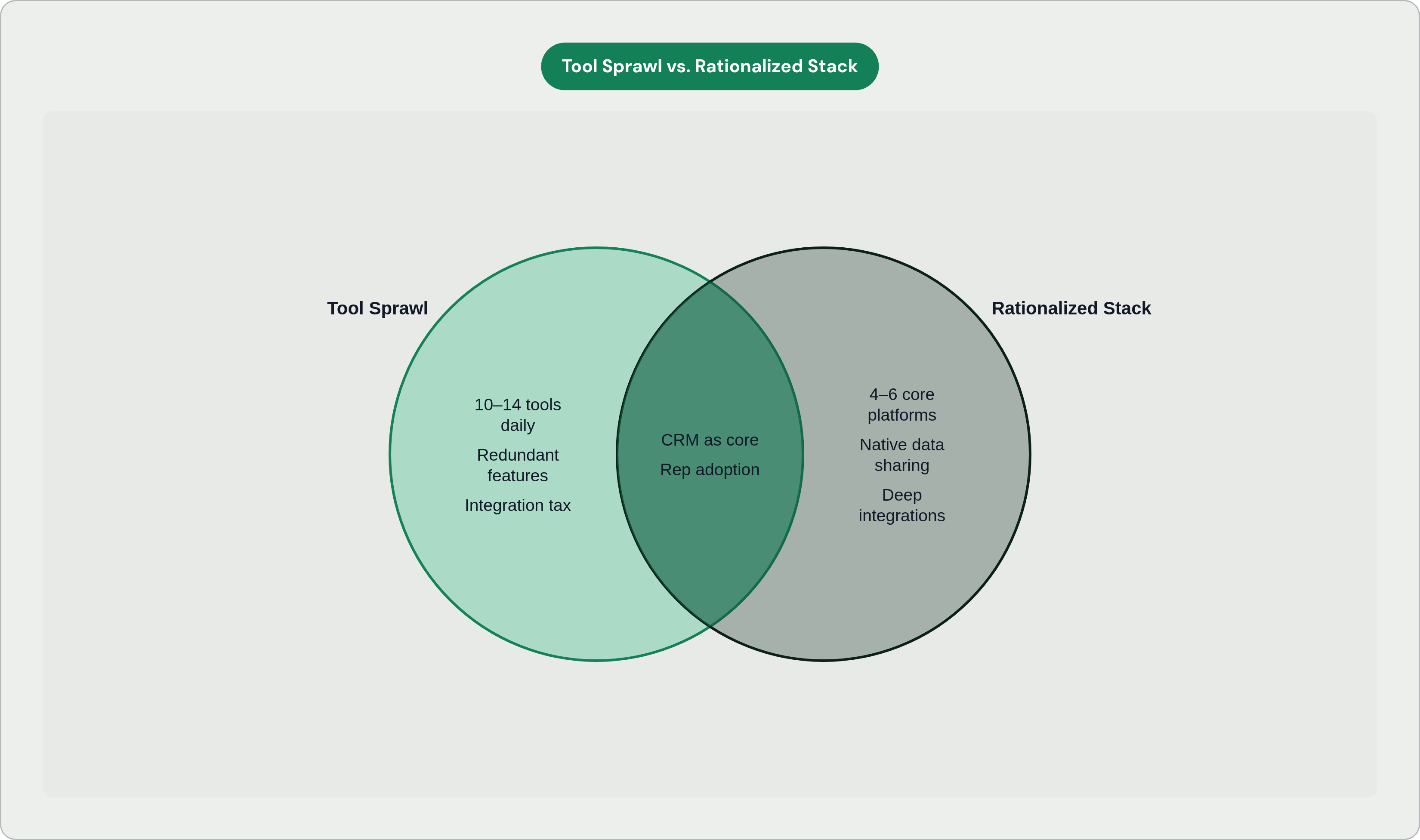
For most distributed B2B sales teams under 500 reps, the target is around six core tools: CRM, outbound engagement, meeting and AI workspace, mutual action plans or digital sales rooms, CPQ and e-signature, and forecasting.
Independent analyses keep landing in the same range: four to six core platforms, deeply integrated. Below four, you start cutting real capability. Above eight, you're almost certainly carrying redundancy or vanity tools that made it through procurement but never earned their spot.
Treetop GTM's analysis found that high-performing B2B sales organizations have consolidated down to 5 to 7 core platforms with deep integrations, while mid-market companies are still running 10 to 14 tools. High performers have already made this move. The stragglers are still explaining why they need 12 tabs open.
There's a spend benchmark worth holding onto here too. OneAway's May 2026 data puts a few thousand dollars per rep per year as the mark of a well-optimized stack. Cross into the mid-five-figures per rep annually and you're probably over-tooled, not better-tooled.
Reserve 20% to 30% of your stack budget for integration and automation. That's not overhead. That's the connective tissue that makes fewer tools actually do more.
The Prospectory case study from November 2025 makes the math concrete. Once they fully loaded the cost of ops time maintaining integrations (15 hours a week), rep onboarding time, and context-switching, their real stack cost was far higher than the subscription total suggested. Cutting down to six tools lifted revenue per rep substantially.
That's the whole point of a rationalized stack: tools that share data natively cut down on the manual logging, the duplicate entry, the slow data decay that fragments a rep's day. The stack stops being something reps fight around. It starts being something that works for them.
Where AI fits into a rationalized stack without adding to the sprawl
Here's where a lot of teams undo all this work in one move: they finish the consolidation, feel good about it, and then bolt on three new AI point solutions. A meeting summarizer here. A prospecting assistant there. A drafting tool somewhere else. Congratulations, you've rebuilt the sprawl with a shinier vocabulary.
The right question to ask before adding any AI tool is simple: does this reduce the number of manual steps between systems, or does it create a new system to manage? If reps now have to go somewhere new to use it, you haven't consolidated anything. You've just added a stop on the tour.
The AI worth keeping runs inside the workflow that already exists. Inside the inbox. Inside the CRM. Alongside the call, not as a separate destination for it.
In practice, that looks like:
- Auto-drafting follow-up emails and logging the CRM update at the same time, without a separate app or a prompt you have to write from scratch
- Booking next steps straight from call context, no manual re-entry
- Generating output that actually sounds like the rep and reflects the real deal history, not a generic template that needs a full editing pass anyway
This is the model Nextstep runs on. It sits alongside the inbox, the calls, and the CRM (Salesforce and HubSpot, natively), handling the admin layer: drafting replies, logging updates, booking next steps, without pulling reps into a new platform or making them learn prompt engineering on top of their actual job.
Run any AI tool through the same filter you used on everything else in the audit: one owner, one measurable outcome, measurable time returned to selling. If an AI tool can't clear that bar, it's sprawl with a chatbot attached.
Highspot's 2025 State of Sales Enablement Report found organizations with well-integrated enablement tech stacks are 42% more likely to boost sales productivity. Note the word: integrated, not more. Integration is the multiplier here. Tool count was never the goal.
Tracking whether the rationalized stack is actually working
Stop measuring activity. Emails sent, calls logged, sequences launched — these numbers tell you people are busy, not that anything got better. Measure outcomes instead: pipeline created per dollar of stack spend, revenue influenced per tool investment, and selling hours actually recovered.
That last one matters most, and it's the one teams forget to track. Reps spend only 28% to 30% of their time selling, the rest eaten by admin, research, and data entry. If the rationalized stack is working, that percentage should move. If it doesn't, something in the audit was likely off — an overlap you missed, an owner who never showed up, or a pilot you skipped because it felt like a formality.
One more question worth asking yourself six months out: has the number of tools crept back up? Sprawl rarely announces itself. It tends to arrive the same way it did the first time, one reasonable purchase at a time. The audit isn't a project you finish once. It's a habit you keep, the same way you'd keep checking a budget you actually care about.
An audit was never about cutting costs for its own sake. It's about finding out, plainly, what you actually have, what your reps actually use, and whether any of it is giving them time back to do the one thing the whole stack is supposed to support: selling.