LinkedIn Sales Navigator Features and CRM Integration Options
Plan choice determines what CRM features and AI tools your team can actually unlock.
I've used Sales Navigator at three different companies now, and I still find the pricing page slightly infuriating. So let's get into it.
LinkedIn Sales Navigator sits on top of LinkedIn's professional graph: over 1 billion members, more than 60 million businesses. It's not some contact database somebody scraped together in a weekend. Regular LinkedIn shows you who's connected to whom. Sales Navigator shows you buying signals, paths to a warm intro, and what's actually happening inside an account you're trying to crack.
More than 1.5 million sellers were using it as of April 2025. At that scale, it's not really a "tool" anymore. It's infrastructure, the same way email or a CRM is infrastructure.
But here's the part almost nobody explains clearly: which plan you're on decides what you can actually do with it. And the CRM piece, where most of the real value lives, only shows up if you've picked the right tier and wired it up correctly. Miss that, and you're paying for a fancier version of LinkedIn search.
How the three pricing tiers determine what features and integrations a team can access
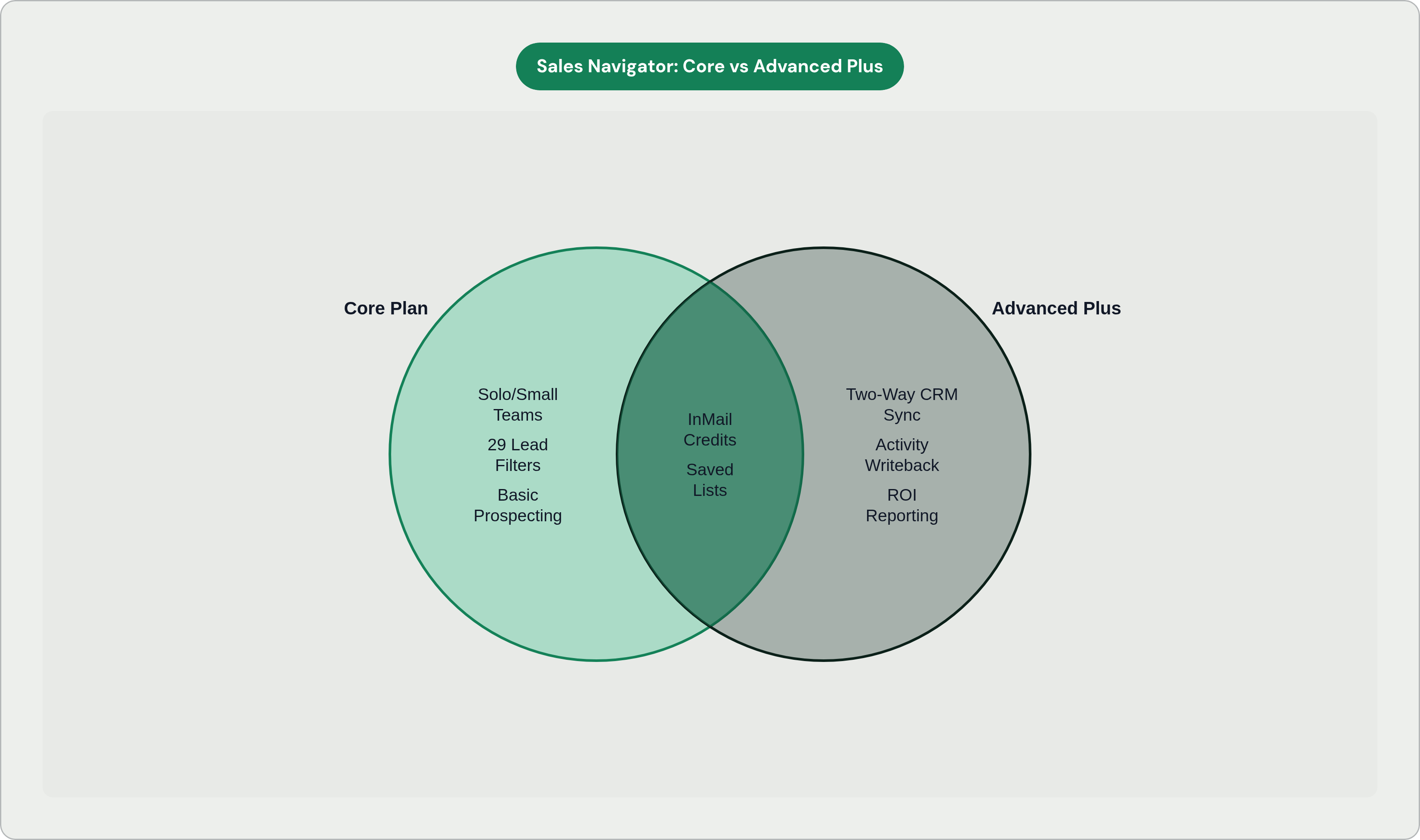
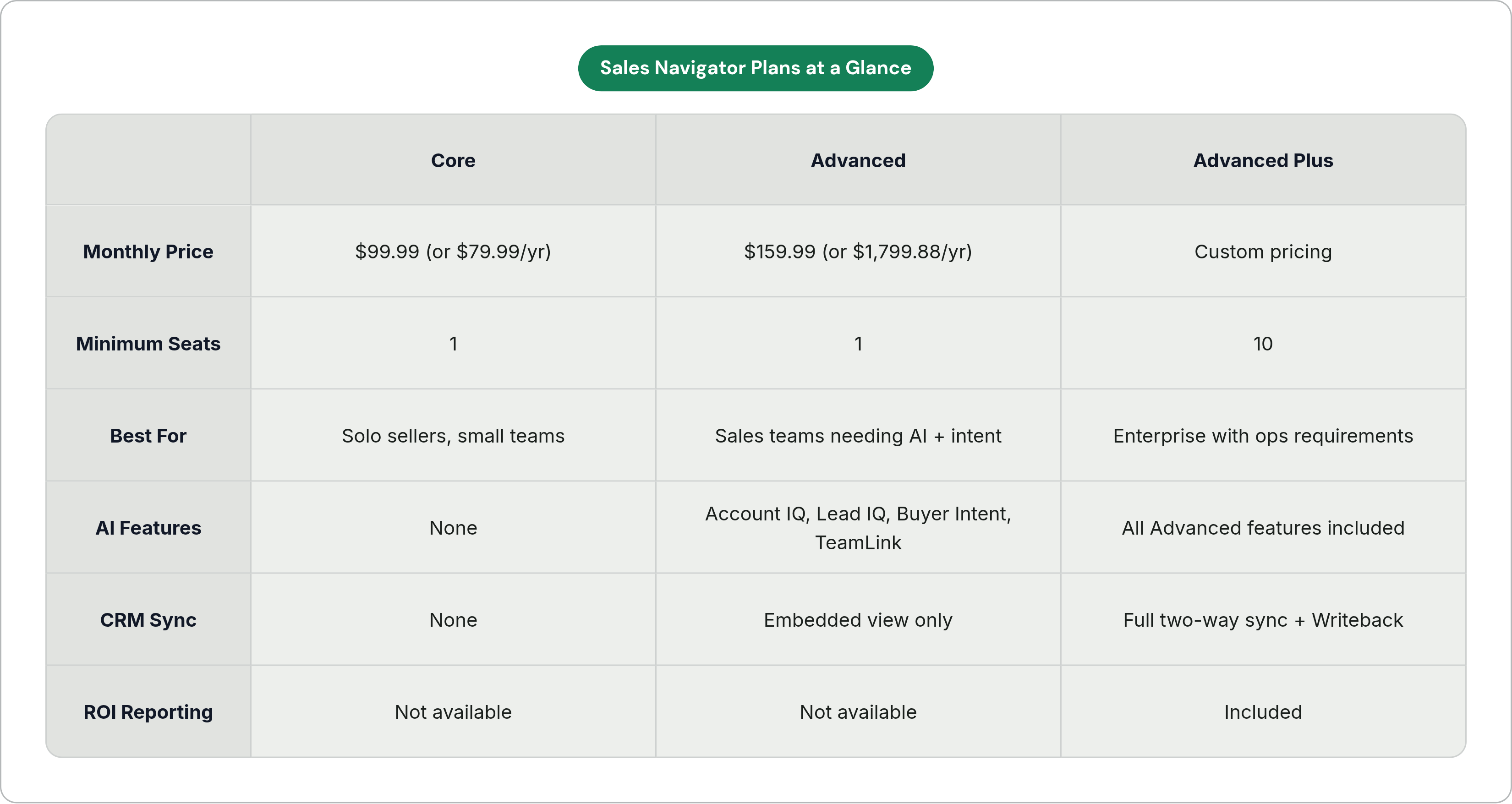
Core runs $99.99 a month, or $79.99 if you pay annually. Built for solo sellers or small teams. You get the prospecting basics. No CRM sync at all.
Advanced lists at $159.99 per user per month, or $1,799.88 a year per license. This is where the AI features live, along with Smart Links, TeamLink, and Buyer Intent. Made for sales teams, not just one rep working a spreadsheet.
Advanced Plus is custom priced and needs a minimum of 10 seats. This is the tier that unlocks two-way CRM sync, Activity Writeback, and ROI reporting. Enterprise territory, where the platform stops being a research tool and starts being an actual workflow.
CRM sync doesn't exist on Core. If your sales ops team cares about writeback, sync health, or ROI attribution, you'll need Advanced Plus.
The prospecting features available across all plans: search, saved lists, alerts, and InMail
Every plan, even the cheapest one, gets a decent prospecting toolkit.
Search runs deep. Core gives you 29 lead filters and 15 account filters. Sales Navigator overall offers 50+ filters across tiers: job title, seniority, company size, industry, years in the role, geography.
You can save up to 10,000 leads and 10,000 accounts. Saved searches ping you when a new profile matches your criteria, so your pipeline stays fresh without you checking it every morning like it's a group chat.
Custom Lists let you group leads and accounts so outreach stays organized. Useful when two people on a team are quietly working the same account without realizing it.
Real-time alerts fire when a saved lead switches jobs, posts something, or engages with industry news. It's a timing signal, not a guarantee, but it beats refreshing someone's profile out of boredom.
InMail comes with 50 credits a month. Reply rates tend to run 18 to 25%, well above cold email. Whether those credits turn into pipeline or just get burned depends largely on how well you target and how relevant the message actually is. Few people want your generic "excited to connect" opener.
Calendar Sync pulls up context on a lead or account right before a scheduled meeting, which sounds small until you're the person who forgot the prospect's company just raised a Series B.
The AI-powered features on Advanced and Advanced Plus plans and what each one actually does
LinkedIn shipped more AI features in the first three months of 2026 than it did across all of 2025. Whether that's a sign of momentum or a sign they were behind is a fair question. Either way, here's what actually showed up.
Account IQ gives you a one-click summary of an account: financial report, strategic priorities, business challenges, key people, executive voices. It pulls together profile data, company activity, and account-level context into a single summary. An hour of pre-call digging turns into a sourced summary in seconds. It's a genuinely handy shortcut, though I'd still fact-check the strategic priorities section before quoting it back to a prospect.
Lead IQ does the same thing for a person: interests, background, likely decision drivers, so outreach isn't a total guess.
Message Assist, still in public beta, drafts InMails by reading a profile and recent account activity, then suggests an opener based on shared content or a mutual connection.
Buyer Intent reads more than 180 behavioral signals: employees interacting with your content, InMail acceptance, ad engagement, activity on your company page. These roll into intent filters, so you can prioritize accounts already showing interest instead of dialing cold.
Conversational AI Search lets you describe a prospect in plain English instead of clicking through a filter list one by one.
Sales Assistant surfaces leads you might not have found on your own, with a stated reason for why they're a fit.
TeamLink shows which of your colleagues already know a prospect. A warm intro from a teammate, paired with an InMail, can boost response rates by up to five times. This one alone is worth the upgrade for teams with any kind of network overlap.
Relationship Map lays out visually who reports to whom inside a buying committee, flags if a contact leaves the account, lets you slot in a replacement, and exports to your CRM. Teammates on the same contract can view and edit it together. Underneath sits Relationship Explorer, which turns the map into a suggested next step instead of just a picture you stare at.
Smart Links let you share content with a prospect and see whether they opened it, so your follow-up has something to reference besides "just checking in" (a phrase that probably deserves retirement from sales altogether).
How CRM integration works mechanically and what it enables that standalone use cannot
Sales Navigator connects to your CRM two ways: as an embedded profile view right inside CRM records, and, on Advanced Plus, as a full two-way sync.
CRM Sync unlocks Auto-Save, Activity Writeback, ROI Reporting, CRM Badges, and the ability to filter Sales Navigator search results from inside the CRM itself.
Activity Writeback logs InMails, connection requests, and messages as tasks inside the CRM automatically. Reps stop typing up what they did after the fact. Managers get visibility into activity without sending the dreaded "quick status update?" Slack message.
Data Validation uses LinkedIn's own data to flag CRM contacts who've left their company, and can push the update straight into the CRM. This fixes the stale contact problem many sales teams quietly accumulate and rarely get around to cleaning up.
Advanced Plus also includes tools to monitor and maintain the health of your CRM sync, so mismatches between systems can be caught and corrected.
Advanced Plus needs 10 seats minimum. If you're a Salesforce shop, you need Professional, Enterprise, Unlimited, Developer, or Performance edition. Not every Salesforce setup qualifies, so check before you get excited about the sales deck.
Salesforce integration: what it covers and how it is set up
Once it's connected, LinkedIn profile data and Sales Navigator insights show up directly inside Salesforce records.
Sync pulls your leads and accounts from Salesforce into Sales Navigator. Writeback sends Sales Navigator activity back the other way, into Salesforce. Two-way, as promised.
If your org runs a Salesforce edition below Professional, this integration typically isn't available to you.
For bigger teams, pairing Relationship Map with Salesforce sync means the whole picture of who's who at an account lives in both systems at once. ROI Reporting connects Sales Navigator activity directly to Salesforce opportunity data, so leadership can see which outreach turned into pipeline instead of taking a rep's word for it.
HubSpot integration: what it covers and where it fits for mid-market teams
The HubSpot integration surfaces Sales Navigator data inside contact records, keeping LinkedIn context accessible without leaving the CRM.
The integration helps keep contact information current using LinkedIn profile data, addressing the same stale-data problem that Data Validation solves on the Salesforce side. Same problem Data Validation solves on the Salesforce side, just surfaced inside HubSpot instead.
The connection between Sales Navigator and HubSpot means LinkedIn engagement can feed into broader outreach workflows, rather than sitting as a separate signal no one acts on.
This setup fits mid-market teams especially well. Think companies running prospecting and deal management largely out of HubSpot, with no separate Salesforce instance sitting alongside it eating up budget.
Salesforce and HubSpot cover most of what teams actually need day to day.
What the integration does not automate and where manual work and tool gaps remain
Activity Writeback catches InMails and connection requests. It does not catch deal notes, call summaries, or follow-up tasks from conversations happening outside LinkedIn. Those still get typed in by hand, much like they did five years ago.
Relationship Maps have to be built and kept up by the rep. The system points out signals; it's not drafting messages or booking the next meeting for you.
Message Assist writes InMails. That's about it. It doesn't touch email replies, doesn't handle call follow-ups, doesn't stitch anything together across channels.
Beyond what Writeback covers, plenty of CRM upkeep stays manual on every plan: meeting notes, updating a pipeline stage, logging the next step. Nobody's built the button that does that for you yet.
And here's the thing worth sitting with: a lot of the intelligence Sales Navigator hands you is only worth as much as how fast a rep acts on it. A strong Buyer Intent signal, or an alert that a prospect just switched jobs, can go stale fast if it's sitting in a queue while the rep is buried in last week's data entry.
How AI sales assistants that work across email, calls, and CRM complement what Sales Navigator provides
Sales Navigator is strong at intelligence and targeting. It tells you who to reach and why. What it doesn't do is the part that happens next: drafting the reply, updating the deal record, logging what actually happened on the call.
That's the gap AI assistants running alongside a rep's inbox, calls, and CRM are built to close. Drafting replies based on deal context and how the rep normally writes. Logging updates automatically. Pulling next steps out of a call transcript instead of a rep's memory an hour later.
Some of these tools connect to the same CRMs Sales Navigator already plugs into, Salesforce and HubSpot among them. A signal from Sales Navigator lands in the CRM, and the assistant picks it up from there. No new platform to learn, no separate workflow bolted on top of an already crowded tech stack. The decent ones adapt to a rep's deal context and tone instead of needing instructions every single time, which removes the step of turning a Sales Navigator insight into an actual email or CRM update.
For teams already on Advanced Plus, where Writeback is capturing LinkedIn activity, adding that layer means the intelligence gets acted on more consistently. Not just when someone happens to have ten free minutes between calls.
How to evaluate whether Sales Navigator's tier and integrations match a team's actual workflow
Start with your CRM, not the Sales Navigator pricing page. That's the mistake most teams make. If you're not running Salesforce Professional or above, or you don't have HubSpot at all, the integration features that justify Advanced Plus's price tag simply aren't available to you. Doesn't matter how good the sales pitch sounds.
Solo seller or small team doing outbound? Core covers search, InMail, and alerts just fine. No integration, but the prospecting side works well enough on its own.
Established CRM, and you want AI research help plus intent signals? Advanced gets you Account IQ, Lead IQ, Buyer Intent, and TeamLink without needing to hit the 10-seat minimum Advanced Plus requires.
Running an enterprise team where data hygiene, activity visibility, and ROI reporting are things sales ops actually stays up worrying about? Advanced Plus, with full two-way sync and the Sync Health Dashboard, is the right call.
Here's a question worth asking that usually doesn't get asked: once the platform surfaces the intelligence and the CRM records it, who's actually acting on it? And how fast? If the answer is "someone logs it manually and drafts a reply by hand later," then a good chunk of the efficiency this whole setup promised just quietly evaporated.
The teams getting the most out of this don't treat Sales Navigator, the CRM, and an AI execution layer as three separate purchases made for three separate reasons in three separate budget cycles. They're pieces of one workflow. And each one is only as useful as whatever happens right after it does its job.