Workflow Automation Examples in Sales CRM Operations
Learn how triggers, conditions, and actions automate repetitive sales work.
A CRM without automation runs on human memory and discipline, and both run out the moment a team grows past a handful of people. Reps spend only about a third of their time actually selling. The rest goes to logging calls, updating fields, routing leads by hand, and chasing deals that have gone quiet, which is the exact work a CRM was supposed to remove and instead piles back onto the rep's plate.
That's what a passive database looks like day to day. Fields go stale because nobody updates them. Follow-ups slip because they lived in someone's head instead of a schedule. Deal stages show what a rep remembered to click, not what actually happened in the deal, so any forecast built on top of that data is a guess wearing a spreadsheet.
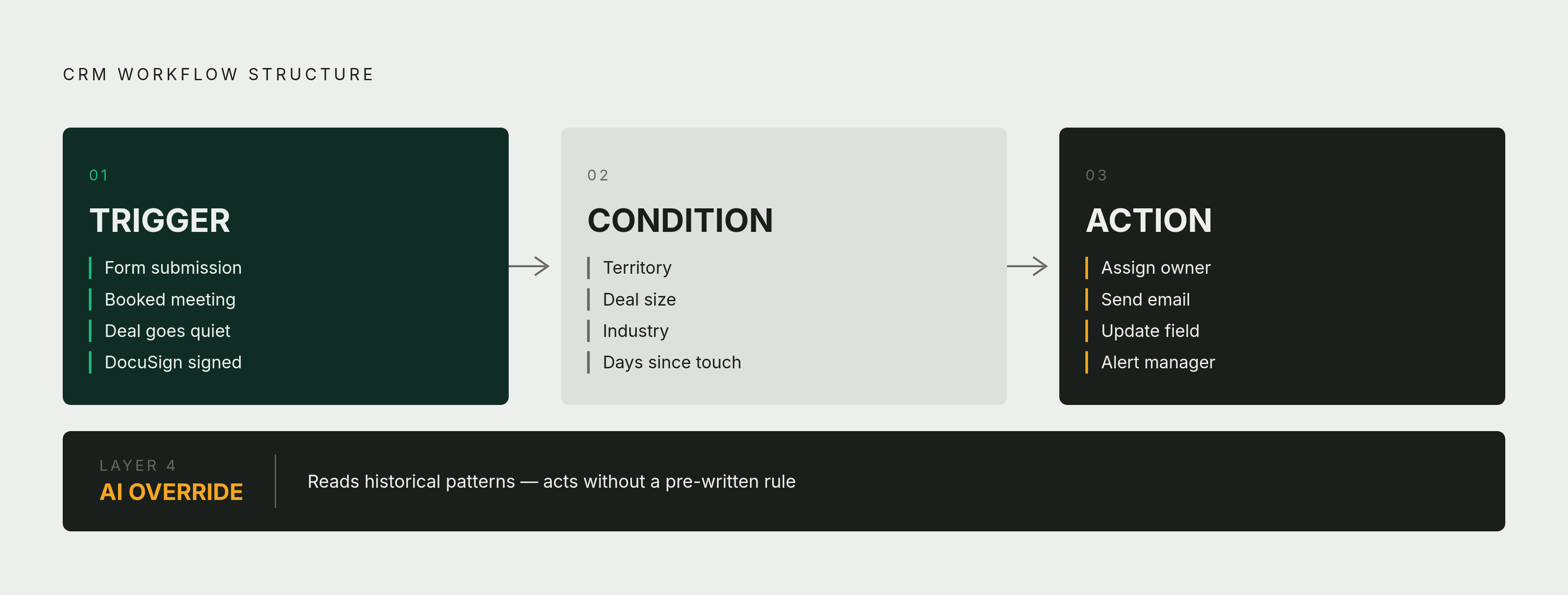
The fix isn't a better dashboard. The system runs on a trigger (a form gets submitted, a meeting gets booked, a deal goes quiet), a condition (which region, how big, how many days since the last touch), and an action the system takes on its own (assign an owner, send an email, update a field, alert a manager). Once that structure is in place, the CRM moves from storing records to actively routing, updating, and alerting on its own. The rest of this piece walks through what that work looks like, category by category.
How the trigger-condition-action framework underlies every workflow type
Every CRM workflow, no matter the platform or the use case, runs on the same three-part logic, and once you see it, every example that follows reads as a variation on one idea rather than a new concept to learn.
A trigger is the event the system watches for: a form submission, a logged meeting, a deal stage change, a stretch of days with no activity, a signature coming back through DocuSign, a meeting landing on the calendar through Calendly. A condition is the rule that checks whether the trigger actually matters right now, things like territory, deal size, industry, or how much time has passed. An action is what the system actually does in response: assigns an owner, fires off an email sequence, updates a field, creates a task, or pings a manager.
There's a fourth layer starting to sit on top of all this: AI that looks across historical patterns, not just the event in front of it, and tries to predict where a deal will stall or suggest what a rep should do next. That's a different kind of logic than trigger-condition-action. Rule-based automation does what it's told, every time, the same way. AI-powered automation looks at context and decides what to do without a rule written in advance for that specific situation, and most sales teams are adopting it while still running their rule-based workflows, not after replacing them.
Keep that trigger-condition-action shape in mind. Every section from here on is that same pattern, pointed at a different part of the sales process.
Lead routing: getting a new lead to the right rep before the window closes
Lead routing is the earliest point in the process, and that's where delay costs the most, so it's the first place the framework shows up. A prospect fills out a form, the CRM creates a contact record, and the system assigns that lead to a rep based on territory, deal size, industry, or product interest, then kicks off a personalized email sequence, all without anyone in ops lifting a finger.
The condition layer is where teams have options. Round-robin distribution spreads leads evenly across a team. Territory rules route by region. Deal-size thresholds can escalate anything that looks like an enterprise opportunity straight to a senior account executive, and some teams route by product line instead. Salesforce's conditional routing setup lets admins build rules that respond differently depending on deal size, industry, customer type, or sales stage, so a high-value opportunity can trigger an extra layer of approval while a small deal moves straight through.
BrightPath Marketing, a 12-person digital agency, is a useful small-team example of this working in practice. Their automated workflow captured leads straight from client websites, scored them based on engagement, and notified the right account manager the moment a prospect crossed into "sales-ready" territory, which meant nobody had to manually triage a lead list every morning.
Routing automation only works if the rules it runs on are correct. Routing automation only follows the territory definitions and ideal-customer-profile criteria it's given, so bad inputs don't just produce bad routing, they produce bad routing fast. The rules get set up to fix that, regardless of which tool runs them. Get the setup right, and the gap between a form submission and an actual human response shrinks from hours to seconds, which matters because in lead conversion, that window is most of the game.
Follow-up sequences: making consistent outreach a system property, not a rep habit
Routing gets a lead to the right person. Follow-up automation makes sure that person actually stays in front of the lead, instead of letting it slide the way busy reps do. The workflow watches the CRM for gaps in engagement, sends personalized messages across channels on a set schedule, and hands the thread back to a rep when it needs a human judgment call, for instance after a set number of touches with no reply.
Good sequences aren't static drips that run on a timer regardless of what the prospect is actually doing. A lead score should update in real time, so if someone jumps to the pricing page halfway through a nurture sequence, that behavior should pull them out of the drip and straight to a rep's desk instead of letting them finish out a sequence built for someone earlier in the funnel.
None of this works without one unglamorous precondition: the CRM has to know what actually happened. Automatic syncing of emails and meetings, rather than waiting for a rep to log them by hand, is what lets the system detect a missed follow-up in the first place. If activity only gets recorded when someone remembers to type it in, the trigger has nothing to fire on.
Opportunity stage progression: keeping deal stages honest and pipelines clean
Routing and follow-up are about outbound motion, getting to the lead and staying in front of them. Stage progression turns the lens inward, onto whether the pipeline itself can be trusted.
The workflow updates opportunity stages automatically based on logged activity or defined events, a Calendly meeting getting booked, a DocuSign signature coming back, and flags opportunities as inactive after a set stretch of no engagement, alerting a manager when a large deal starts showing risk signals. Compare that to the manual version: reps update stages when they happen to remember, so a stage often reflects what a rep intended to do rather than what the deal actually looks like. A deal sitting "in proposal" for three weeks with zero activity is stalled, but the forecast still counts it as live unless something forces a correction.
One enterprise software company running Salesforce built exactly this kind of automation, pairing renewal reminders with custom dashboards that tracked pipeline velocity by product line and by region. Forecast accuracy climbed to 89% within six months, and the sales cycle got noticeably shorter in the same window.
Clean stage data doesn't just make one spreadsheet look nicer. It makes pipeline reviews faster because managers aren't spending the meeting reconciling what a rep says against what the CRM shows. It makes forecast calls more defensible to leadership above the sales floor. It makes coaching sharper, because a manager can see which deals are actually stuck instead of guessing from a rep's tone. All of that depends on stages reflecting reality, and none of it is possible when reps are cleaning up fields right before a review just to make the numbers presentable.
Activity logging: making CRM data a byproduct of work rather than extra work
Manual activity logging is the biggest single reason CRM data goes bad, and automating it is what turns the CRM from something reps have to maintain into something that maintains itself. The workflow logs emails to the right record automatically, syncs calendar meetings, captures call activity, and creates a follow-up task right after a meeting ends, all without a rep typing anything in.
Most CRMs fail to earn back the time and money put into them for a simple reason: they're built around data entry instead of data flow. Teams end up spending more time maintaining records than actually reading what those records say, and the moment logging starts to feel like a chore, adoption drops and the whole system turns into dead weight instead of an asset.
AI-generated meeting summaries and automatic action-item creation push this further than a basic sync. Instead of just recording that a call happened, the system interprets what was said and produces a structured note that would otherwise take a rep several minutes to type up by hand. Operating at exactly this layer is what makes activity data exist somewhere, which every other workflow in this piece (routing, follow-up, stage progression) depends on.
The adoption logic runs in one direction and then feeds back on itself. When logging happens on its own, reps stop avoiding the CRM. When reps stop avoiding it, the data stays clean enough for every other automation built on top of it to keep working. The loop reinforces itself over time; it's not a problem a team fixes once and walks away from.
Contract and document workflows: removing the manual steps between verbal agreement and signed paper
Somewhere between a prospect saying yes on a call and a signature landing on paper, a lot of deals lose momentum for no reason other than paperwork. Document automation closes that gap by turning contract generation and signature into another workflow event instead of a manual task sitting on someone's to-do list.
The trigger here is a deal moving into the "proposal" stage, or a verbal close getting logged. From there, the system pulls customer data straight from the CRM into a contract template, sends it out for e-signature through DocuSign or a similar tool, watches for the signature to come back, advances the deal stage automatically once it does, and kicks off onboarding tasks on the other side. Salesforce names several of these as distinct, chainable automations: a quote creation workflow, a contract approvals workflow, and a new customer onboarding workflow, each one firing as a deal crosses a specific threshold.
The error-reduction case here is straightforward. Building a contract by hand from deal data means someone is retyping or copy-pasting numbers, and every manual transcription is a chance for a typo to turn into a legal document. A populated template skips the copying step entirely and produces a contract that matches what the CRM actually has on record.
One practical note for anyone running this on Salesforce specifically: Workflow Rules and Process Builder reached end of support as of December 31, 2025. Teams that built contract or approval automation on either of those tools now need to migrate to Flow Builder, and any document workflow still sitting on the older tooling needs to be checked against that deadline before it breaks.
Customer lifecycle workflows: applying automation to retention and expansion after the close
A lot of automation budget goes toward the top of the funnel, routing and converting new leads, but some of the highest return per trigger occurs after the deal closes, in the stretch where doing nothing is the real risk. That silence is usually the first sign of a renewal that's about to walk.
This category covers renewal reminders, upsell triggers based on actual product usage, churn alerts, and the handoff from sales to customer success once a deal closes. The same enterprise software company mentioned earlier built automatic renewal reminders paired with alerts to its customer success team ahead of contract renewal dates, and renewal rates increased meaningfully within six months of putting that system in place.
The principle holds outside of pure sales contexts too. Wiley, the publishing company, used automation, including AI chatbots fielding common customer questions, to handle heavy seasonal spikes in support volume without hiring temporary staff to cover the surge. Cases got resolved faster, and the company reported an ROI above 200%.
Both examples trace back to the same cause: a gap in automation produces the same failure, whether it happens before the sale or after. Without lifecycle automation, customer success runs on the same memory and manual tracking that breaks pre-sale workflows when nobody's watching. It's the identical failure mode, occurring later in the revenue cycle, after the deal is already won, where the cost of losing it quietly is higher.
Agentic AI as the next layer on top of rule-based CRM workflows
Everything covered so far runs on rules someone wrote in advance: if this happens, under these conditions, do that. It's dependable precisely because it never improvises. The next layer coming into sales CRMs doesn't replace that logic, it sits on top of it, analyzing patterns across historical data to predict where a deal is likely to stall or recommend what a rep should do next, rather than waiting for a predefined trigger to fire.
The distinction matters because it changes what the system is actually doing. A rule-based workflow executes what it was configured to do, no more and no less. An agentic workflow evaluates the context in front of it and acts without a pre-written rule covering that exact scenario. It can handle situations nobody anticipated when the automation was built. Most sales teams run both at once, often in the same pipeline, and the category is still being figured out in real time rather than settling into a fixed playbook.
What stays constant is the foundation underneath it. Agentic AI still needs clean activity data, honest stage progression, and reliable logging to have anything worth analyzing. Skipping the rule-based groundwork covered in this piece leaves the smartest AI layer in the world with nothing to work with.